A smart food scale is a digital kitchen scale that connects to an app on your phone or tablet to track nutrition data, log meals, and calculate macros automatically. You place food on the platform, the scale reads the weight, and the companion app pulls calorie and nutrient counts from a database in real time. This guide covers how smart food scales explained: apps, nutrition data & connectivity work together, what the hardware actually does, and where the tracking falls short.
If you are trying to manage a specific diet, hit protein targets, or just understand what you eat, these devices remove the manual math. They still require some input from you, though. Knowing how the software matches foods and how the wireless connection behaves will save you a lot of frustration at the counter.
How Smart Food Scales Explained: Apps, Nutrition Data & Connectivity Work Together
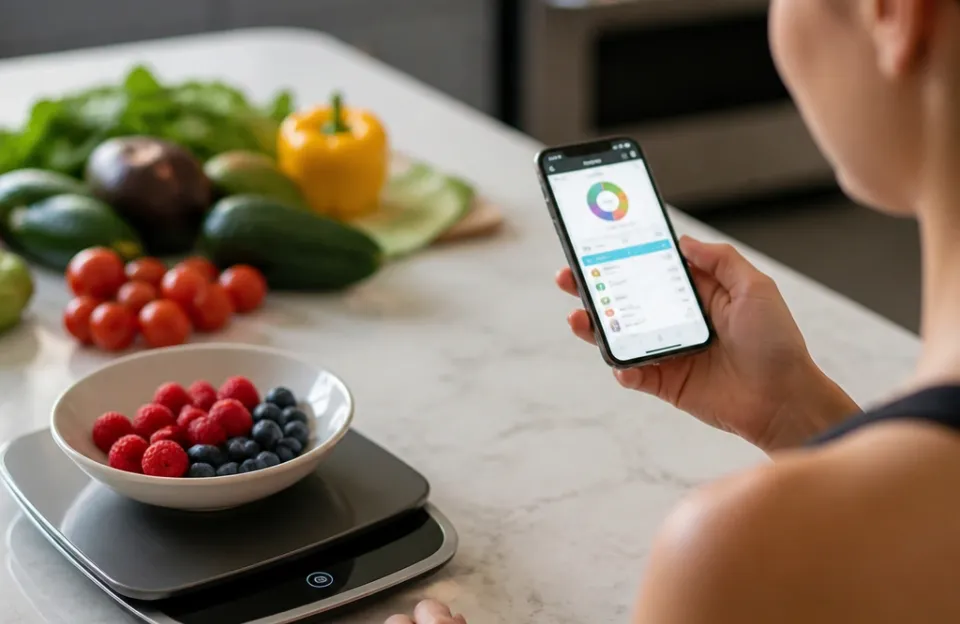
The system relies on three parts: the load cell inside the scale, the wireless chip, and the software database. The load cell converts physical pressure into an electrical signal to determine weight. That number gets passed to a Bluetooth or Wi-Fi module.
Your phone receives the weight and pairs it with a food entry you select in the app.
Once paired, the app multiplies the standard nutritional values by your exact weight. If 100 grams of chicken breast has 31 grams of protein, and you weigh out 142 grams, the app calculates 44 grams of protein instantly. You don't need to do any math.
The screen updates as you add or remove food from the platform.
Connectivity is the bridge between the hardware and the database. Without a stable link, the scale reverts to being a basic digital scale. Most models use Bluetooth Low Energy (BLE) because it draws very little power and keeps the battery running for months.
A few higher-end options use Wi-Fi to sync data directly to cloud accounts without needing the app open on your phone during every meal.
The Role of Companion Apps in Daily Meal Tracking
Companion apps do the heavy lifting. The scale itself only measures weight. The software provides the interface, the database search, and the daily dashboard.
When you open the app, you usually start by searching for a food item. You can type "banana" or scan a barcode if the app supports it. Once selected, the app waits for the scale to report a weight.
Many apps allow you to build custom recipes. You weigh each ingredient one by one, adding them to a single recipe file. The app totals the calories, fat, carbs, and protein for the entire batch.
You then divide by the number of servings. This is useful for meal prep or family dinners where everyone eats the same dish.
Some apps also sync with broader health platforms. If you use Apple Health, Samsung Health, or Garmin Connect, the nutrition data can flow directly into your daily activity summary. This means your net calorie count adjusts automatically based on what you ate and what you burned.
Keeping your kitchen tools synced with your overall routine matters. For instance, monitoring heat accurately is just as important when cooking, which is why having reliable temperature gear prevents overcooking while you focus on portion sizes.
The user experience varies widely between brands. Some apps are fast and clean. Others have cluttered menus or slow search functions.
Before buying a scale, look at screenshots of the app and read user reviews specifically about the software. The best hardware is useless if the app crashes every time you try to log lunch.
Where the Nutrition Numbers Actually Come From
The accuracy of your tracking depends entirely on the database the app queries. Most apps license data from large aggregators or pull from government sources. In the United States, the USDA FoodData Central is the standard reference.
It contains detailed nutrient profiles for thousands of raw and processed foods.
When an app uses USDA data, the numbers for whole foods like raw vegetables, plain meats, and dry grains are highly reliable. However, many apps also include crowdsourced entries. These are items added by other users.
A crowdsourced entry for "homemade lasagna" might be wildly inaccurate because someone typed in the wrong serving size or forgot to account for the oil used in the pan.
Branded foods are another category. Manufacturers submit their own nutrition facts panels to these databases. While generally accurate, recipes change.
A cereal brand might reduce sugar or switch flour types without updating the database immediately. Always check if the app entry matches the current packaging in your pantry.
For strict dietary needs, stick to verified entries. Apps often label official database items differently from user-generated ones. Look for a checkmark or a source tag.
If you are tracking micronutrients like sodium or potassium for medical reasons, relying on unverified crowdsourced data is risky.
Bluetooth vs Wi-Fi: Choosing the Right Connection
Bluetooth is the default for almost all smart food scales. It requires your phone to be nearby and the app to be open. The pairing process usually takes a few seconds once set up.
BLE is efficient, meaning a set of AAA batteries can last six months to a year depending on usage.
Wi-Fi scales connect directly to your home network. They push data to the cloud regardless of whether your phone is in the kitchen. This is convenient if multiple people use the scale and want data sent to different accounts, or if you prefer logging meals on a tablet in another room.
The trade-off is power consumption. Wi-Fi chips drain batteries faster, so these scales often need rechargeable lithium-ion cells or frequent charging.
Connection drops happen with both types. Bluetooth interference from microwaves or other appliances can cause brief disconnects. Wi-Fi scales depend on your router's stability.
If your network goes down, you lose the smart tracking until it comes back. In practice, keeping your phone close via Bluetooth is the most consistent method for daily cooking. Just as you would troubleshoot a dropping sensor signal when grilling, moving closer to the scale or restarting the app usually fixes Bluetooth hiccups in the kitchen.
| Connection Type | Power Usage | Range | Requires App Open | Best For |
|---|---|---|---|---|
| Bluetooth (BLE) | Very low | ~30 feet | Yes | Solo tracking, long battery life |
| Wi-Fi | Higher | Whole house | No | Multi-user households, background syncing |
Accuracy Limits and Load Cell Sensitivity
Smart food scales typically measure in 1-gram increments. Some offer 0.1-gram precision for very small quantities like spices or yeast. The load cell determines this sensitivity.
Cheaper models might drift slightly after repeated heavy loads, while better ones hold their calibration longer.
Tare functions are standard. You place a bowl on the scale, press tare, and the display resets to zero. You can do this multiple times to layer ingredients in the same bowl.
The app records each addition separately if you log them step-by-step.
Maximum capacity usually sits around 5 kilograms or 11 pounds. Exceeding this limit can permanently damage the load cell. If you need to weigh a massive batch of dough, divide it into smaller portions.
Pushing past the rated capacity is a common way people break these devices.
Keep in mind that the scale measures mass, not volume. A cup of flour can weigh anywhere from 120 to 150 grams depending on how packed it is. This is exactly why weighing is superior to using measuring cups for nutrition tracking.
You get the actual mass, which is what the database uses to calculate calories. Precision matters across all kitchen tasks. Whether you are checking the exact heat of frying oil or weighing pasta, accurate instruments prevent guesswork.
Logging Mixed Meals and Complex Recipes
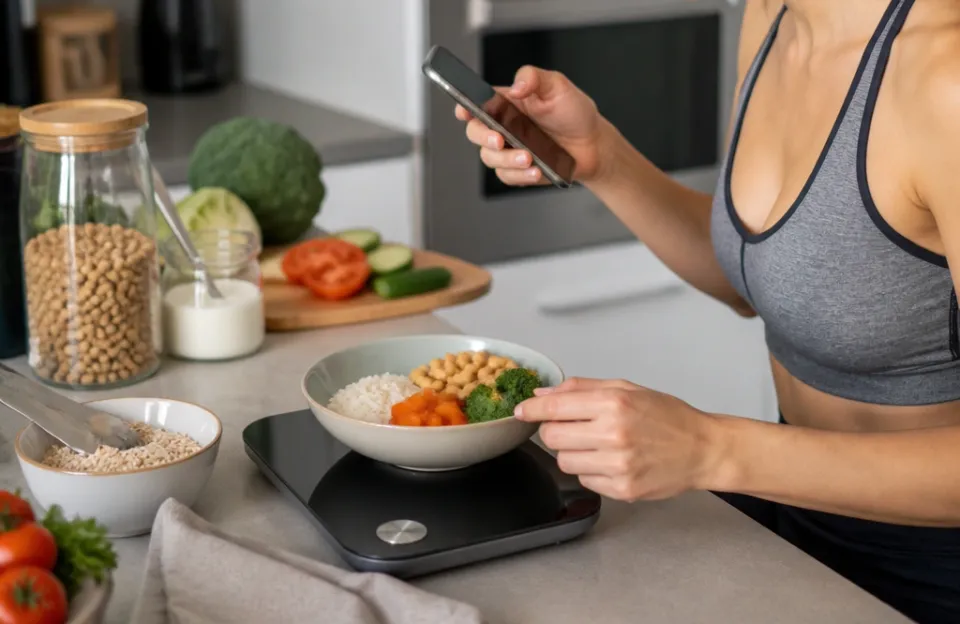
Weighing a single apple is straightforward. Weighing a stir-fry with five ingredients requires a workflow. The best approach is sequential weighing.
Place your pan or bowl on the scale. Tare it. Add the first ingredient, weigh it, and log it in the app.
Tare again. Add the second ingredient, weigh it, and log it. Repeat until the dish is complete.
This method takes a minute or two longer than dumping everything in at once, but it gives you exact macros for the entire recipe. If you cook a large batch of soup, you can weigh the total finished product. Then, when you serve yourself a bowl, weigh just that portion.
The app calculates what fraction of the total nutrients is in your bowl.
Mixed meals present a challenge for database matching. If you search for "chicken salad," you will find hundreds of entries with completely different ratios of mayo, greens, and meat. Building the recipe yourself from individual weighed components is always more accurate than trusting a generic database entry for a mixed dish.
Practical Limitations Nobody Mentions in Ads
Smart scales require maintenance. Batteries die. Apps update and sometimes introduce bugs.
Phone operating systems change permissions, which can break Bluetooth connections until you manually reset them. You are adding a piece of technology to a messy environment where water, flour dust, and sticky spills happen constantly.
Water resistance is rarely high on these devices. Most are splash-resistant at best. Submerging the base to clean it will destroy the electronics.
You have to wipe the platform carefully and avoid letting liquids seep into the seams.
Another limitation is speed. Waiting for the app to load, finding the food in the database, and waiting for the Bluetooth handshake adds friction to cooking. If you are rushing to get dinner on the table, you might skip logging entirely.
Many users find they only track meticulously for a few weeks before switching to estimating based on what they learned during the tracking phase.
Also, consider the physical space. A smart scale takes up counter space. If your kitchen is small, leaving it out permanently might be annoying.
Storing it in a drawer means pulling it out every time you want to track something, which adds another barrier to consistent use. Maintaining a tidy workspace helps. If you are already reorganizing your kitchen layout or looking at cabinet surface updates, planning a dedicated spot for your scale makes daily use much easier.
Who Actually Benefits from Connected Nutrition Tracking
People managing diabetes benefit greatly from precise carbohydrate counting. Knowing exactly how many grams of carbs are in a portion of rice helps match insulin doses accurately. Athletes tracking macros for muscle gain or fat loss also get value from removing estimation errors.
Hitting a specific protein target is much easier when you know your chicken breast is exactly 185 grams rather than "about half a pound."
Those recovering from eating disorders should approach these tools with caution. Constant weighing and tracking can trigger obsessive behaviors. Many clinicians advise against hyper-specific food logging for individuals with a history of disordered eating.
The tool is neutral, but the psychological impact depends on the user.
Casual cooks who just want to bake better bread will appreciate the precision of weighing flour and water, even if they ignore the calorie tracking. Baking is chemistry, and exact weights yield consistent results. You don't need the app for that, but having the scale is necessary.
Common Misconceptions About Smart Scale Databases
- All database entries are lab-tested. Most branded entries come from manufacturer labels, and whole foods come from government averages. Crowdsourced entries are just guesses typed in by other users.
- The scale knows what food is on it. The scale only knows the weight. You must tell the app what the food is through manual search or barcode scanning.
- Tracking guarantees weight loss. The scale provides data. Caloric deficit causes weight loss. Having perfect data doesn't change the physics if you still eat too much.
- Bluetooth pairing works instantly every time. Interference, dead batteries, and OS updates frequently require you to forget the device and re-pair it.
- You can wash the whole unit under the tap. Only the top platform is meant to get wet, and even then, only with a damp cloth. The internal electronics are exposed to moisture easily.
Frequently asked questions
Do smart food scales work without a phone?
Yes, they function as standard digital scales without a phone. You can weigh ingredients and read the mass on the display. However, the automatic nutrition calculation, macro tracking, and database lookups require the companion app running on a connected device.
How accurate are the calorie counts on these apps?
The accuracy depends on the database source and your weighing precision. Government databases like USDA FoodData Central provide reliable averages for whole foods. Packaged food entries rely on the manufacturer's nutrition label.
The margin of error increases significantly if you use unverified, user-submitted entries for complex homemade meals.
Can multiple people use the same smart scale?
Most apps support multiple user profiles. You switch profiles within the app before weighing your food. The scale itself doesn't store user data; it simply transmits the weight to whichever profile is currently active on the connected phone or tablet.
Why does my scale keep disconnecting from the app?
Bluetooth interference is the most common cause. Microwaves, Wi-Fi routers, and other wireless devices operate near the 2.4 GHz frequency used by many Bluetooth connections. Low batteries in the scale, outdated app versions, or restrictive phone privacy settings blocking Bluetooth access also cause frequent drops.
Are smart food scales worth it for casual cooking?
If you only need to measure flour for occasional baking, a basic digital scale costs less and avoids software headaches. Smart scales are worth the investment primarily for people who actively track macronutrients, manage medical diets, or log daily caloric intake over extended periods.
Does the scale measure liquid volumes?
No, the load cell measures mass in grams or ounces. Some apps convert water weight to milliliters since one gram of water equals one milliliter. For other liquids like oil or honey, the density differs, so a weight-to-volume conversion inside the app will be an approximation unless calibrated for that specific liquid.
What to Expect When You Start Weighing Everything
Smart food scales explained: apps, nutrition data & connectivity show us that tracking nutrition is mostly a software task built on simple hardware. The load cell does one job reliably. The app handles the complexity.
Understanding this division helps you troubleshoot when things go wrong.
Expect a learning curve during the first week. Searching for foods, taring bowls repeatedly, and keeping your phone awake while your hands are covered in flour feels clumsy initially. After a few days, the sequence becomes muscle memory.
You learn which database entries to trust and which to ignore.
Keep the scale dry. Change the batteries when the display dims or Bluetooth pairings fail randomly. Treat the companion app as a reference tool rather than absolute truth, especially for crowdsourced meals.
If you combine precise weighing with verified data, you get a clear picture of your intake that guessing with measuring cups never provides.