Can a food scale connect to Apple Health? The short answer is no. A kitchen food scale cannot send weight data directly to the Apple Health app.
Apple Health tracks biological metrics like steps, heart rate, and sleep. It does not accept raw food weights from external hardware.
If you want to track what you eat using Apple Health, you need a middleman. Third-party nutrition apps act as that bridge. You weigh your food on a smart scale, send the data to a companion app, and that app writes the nutritional information into Apple Health.
This article explains exactly how that process works, which types of scales support it, and where the system falls short. We will also cover manual methods for people who own standard digital scales without wireless capabilities. Understanding how to log meals accurately pairs well with other kitchen routines, like keeping oven temperatures precise when baking or roasting.
Why Kitchen Scales Don’t Talk Directly to Apple Health

Apple Health organizes data into specific categories. You can find sections for activity, vitals, sleep, and nutrition. Under the nutrition category, Apple Health accepts entries for calories, carbohydrates, protein, fat, vitamins, and minerals.
It does not have a data field for “grams of chicken” or “ounces of rice.” The platform expects processed nutritional values, not raw physical weights.
Because of this architecture, a Bluetooth food scale has nowhere to push its numbers inside Apple Health. Even if the scale transmits a reading of 150 grams via Bluetooth, Apple’s operating system lacks the framework to receive it. The data needs context before Apple Health can use it.
One hundred fifty grams of raw salmon contains a completely different nutritional profile than 150 grams of white sugar. The scale only knows the mass. It doesn’t know the food.
This is why every connected food scale on the market relies on a proprietary app or a third-party nutrition tracker. The companion app receives the weight from the scale over Bluetooth. Then, the user selects the food item from a database within that app.
The app calculates the macros based on the weight and the specific food entry. Finally, the app sends those calculated macros to Apple Health. For more details on how devices communicate wirelessly in the kitchen, troubleshooting a dropped Bluetooth signal follows similar principles across different gadgets.
How Smart Food Scales Sync Data Through Companion Apps
Smart food scales use Bluetooth Low Energy (BLE) to communicate with smartphones. When you place an item on the scale, the hardware measures the force applied to the load cell. It converts that force into a digital weight reading.
If the scale is paired with its companion app, it transmits that reading instantly to your phone screen.
The companion app is where the real work happens. After the weight appears on your screen, you type the name of the food into a search bar. The app pulls up matches from a nutritional database.
You select the correct item. The app multiplies the database’s per-gram nutritional values by the total weight sitting on the scale. If you weighed 200 grams of cooked quinoa, the app calculates the exact calories, carbs, fiber, and protein for that specific portion.
Once the calculation is complete, the app offers a button to log the meal. Tapping that button saves the entry locally and pushes the data to Apple Health, provided you granted the app permission to write data. You can verify these permissions by opening Apple Health, tapping your profile picture, selecting “Apps and Services,” and checking if the nutrition app has toggles turned on for dietary energy, protein, and other nutrients.
Some scales come with their own dedicated apps built by the scale manufacturer. Others are designed to work with popular independent tracking platforms. In both cases, the scale never touches Apple Health.
The software handles the entire translation process.
Can a Food Scale Connect to Apple Health Using Third-Party Trackers
Yes, but only through specific third-party applications. Several major nutrition tracking apps support Bluetooth scale integration and also sync with Apple Health. MyFitnessPal, Lose It!, Cronometer, and MacroFactor are common examples.
Each handles the connection slightly differently.
Some apps maintain direct partnerships with scale manufacturers. If you buy a supported brand of smart scale, you pair it directly inside the tracking app rather than using the scale maker’s standalone software. The tracking app receives the weight, lets you search for the food, logs the meal, and syncs everything to Apple Health in one continuous flow.
Other setups require you to use two apps simultaneously. You open the scale manufacturer’s app to capture the weight. That app identifies the food and calculates the macros.
Then, the scale manufacturer’s app shares that data with Apple Health. Your preferred daily tracker reads the data back out of Apple Health to display it alongside your other meals. This two-app method works, but it introduces friction.
You have to keep both apps updated and ensure background syncing remains active.
When choosing a tracking app for this purpose, check its integration list. Look for explicit mentions of Bluetooth scale support. An app might sync perfectly with Apple Health for calorie logging while lacking any ability to receive signals from external weighing hardware.
Checking reviews or the developer’s FAQ page usually clarifies this before you commit to a subscription. Accurate ingredient measurement matters just as much when you are checking doneness for thick cuts as it does when counting macros.
What Happens When You Only Have a Standard Digital Scale
Most kitchens contain basic digital scales. These models run on batteries, display the weight on a small LCD screen, and lack any wireless radio inside. They cannot transmit data to a phone.
If you own one of these, you can still get your food logged into Apple Health. You just have to do it manually.
The process involves weighing your food, looking at the number on the screen, opening your nutrition app, typing the food name, and then typing the weight into the app’s serving size field. It takes about thirty seconds longer per item compared to a Bluetooth setup. Over the course of a meal with five ingredients, that adds up to a few minutes of extra tapping.
Manual logging carries a higher risk of transcription errors. You might read 145 grams on the scale and accidentally type 154 grams into your phone. With a smart scale, the number transfers digitally without human intervention.
However, manual logging costs nothing extra. Smart scales typically carry a price premium over basic models with identical weight capacities and accuracy ratings.
For many people, the manual method is perfectly fine. If you only track meals occasionally, or if you prepare simple dishes with one or two ingredients, buying a Bluetooth-enabled scale solely for Apple Health syncing rarely makes financial sense. You can achieve the same end result in the Apple Health dashboard using the tools you already own.
Differences Between Smart Scales and Manual Logging Methods
Understanding the tradeoffs between connected and disconnected workflows helps set realistic expectations. Neither method changes the underlying rule that Apple Health requires a software intermediary.
| Attribute | Bluetooth Smart Scale | Standard Digital Scale |
|---|---|---|
| Data Transfer | Automatic via BLE | Manual typing required |
| Error Risk | Low, digital transmission | Higher, prone to typos |
| App Requirement | Companion app plus tracker | Tracker app only |
| Setup Time | Pairing and permissions needed | None beyond turning it on |
| Cost | Higher initial purchase price | Lower initial purchase price |
| Speed Per Item | Fast, weight populates instantly | Slower, requires reading and typing |
Both methods ultimately deposit the same data points into Apple Health. The difference lies entirely in the workflow leading up to that deposit. If speed and convenience drive your habits, the automated route reduces friction.
If simplicity and budget matter more, the manual route gets the job done without extra hardware. Precision tools vary widely across the kitchen; knowing which thermometer fits your cooking style is another example of matching equipment to your actual daily needs.
Permissions and Privacy Settings for Nutrition Data
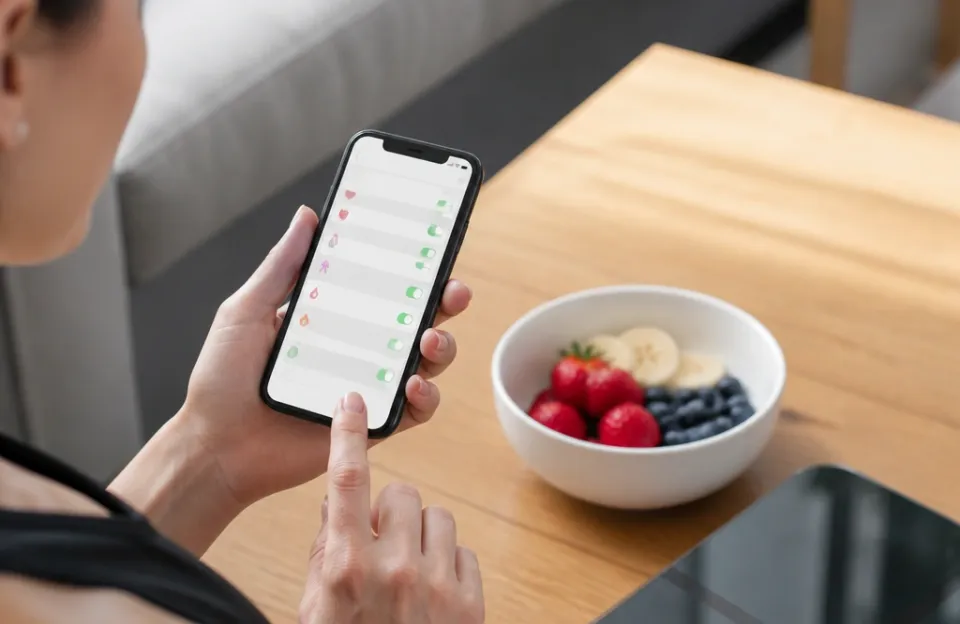
Getting a food scale to populate Apple Health requires navigating iOS privacy settings. Apple restricts which apps can read or write specific health data. When you first link a nutrition app to Apple Health, the system presents a prompt asking for access.
You must explicitly enable “Write” permissions for the nutritional categories you care about. If you want the app to log dietary energy, turn on the write toggle for calories. If you track macronutrients, enable write access for protein, total fat, and carbohydrates.
Leaving these toggles off means the app calculates your meal data internally but never passes it along to the central Apple Health repository.
Read permissions matter too. Some advanced tracking apps request read access to your basal metabolic rate or active energy expenditure from Apple Health. They use this data to adjust your daily calorie targets automatically.
Review these requests carefully. Grant read access only to categories relevant to your dietary goals.
It is also worth noting that data flows in one direction during the weighing process. The scale sends data to the app. The app sends data to Apple Health.
Apple Health does not send commands back down the chain to control the scale. If your scale loses its Bluetooth connection, Apple Health cannot trigger a reconnection. You have to manage the hardware pairing through the companion app or your iPhone’s main Bluetooth settings menu.
Limitations of Tracking Food Weight in Apple Health
Even when the entire chain works perfectly, several limitations affect the final data. Apple Health stores nutritional estimates, not laboratory analyses. The databases powering companion apps rely on averages.
A generic entry for “raw chicken breast” assumes a standard ratio of water, protein, and fat. The actual piece of poultry on your scale might differ slightly due to the bird’s diet, breed, or processing method.
Mixed dishes present another challenge. If you weigh a bowl of chili, the scale tells you the total mass. It cannot separate the beans from the meat, tomatoes, and oil.
To log this accurately, you either need a recipe breakdown where you weighed every raw ingredient before cooking, or you must rely on a generic “chili” database entry that might be far off from your specific batch.
Cooking loss also skews data. Meat loses water weight during roasting. Vegetables shrink when sautéed.
If you weigh food after cooking but select the “raw” entry in your app, your calorie calculations will be wrong. Always match the state of the food on the scale to the corresponding database entry. Select “cooked” entries for post-heating weights.
Just as you would rely on a fast-reading probe to verify safe temperatures quickly, matching your weight state to the database entry prevents silent errors in your daily totals.
Sync delays happen frequently. Background app refresh restrictions on iOS can prevent a companion app from pushing data to Apple Health immediately. You might weigh your lunch at noon, but the calories do not appear in your Apple Health rings until you manually open the tracking app later in the evening.
This delay does not mean the data is lost. It simply waits in a queue until the operating system allows the transfer.
Troubleshooting Connection Drops Between Scales and Phones
Bluetooth interference is common in kitchens. Microwaves, Wi-Fi routers, and other wireless devices operate on frequencies that can crowd the 2.4 GHz band used by Bluetooth Low Energy. If your scale connects initially but drops out mid-weighing, move your phone closer to the scale.
Keep the phone away from the microwave while it runs.
Battery levels in the scale also cause erratic behavior. As the coin cell or AAA batteries drain, the Bluetooth transmitter weakens. The scale might still display weights on its local screen perfectly, but fail to broadcast them to your phone.
Replacing the batteries often resolves unexplained sync failures.
Software updates occasionally break established connections. If your iOS version updates overnight and the scale stops talking to the app, check the App Store for a pending update to the companion software. Developers frequently release patches to maintain compatibility with new Apple frameworks.
Deleting the device from your Bluetooth menu and re-pairing it from scratch clears corrupted handshake files that accumulate over time.
Frequently asked questions
Do I need a special scale to send data to Apple Health?
You need a scale with Bluetooth capabilities and a companion app that supports Apple Health integration. Standard digital scales without wireless radios cannot transmit data. Any Bluetooth-enabled food scale paired with a compatible nutrition tracking app will work, provided the app has permission to write dietary data to your Apple Health profile.
Can Apple Health read the exact grams of food I ate?
No. Apple Health does not store raw food weights. It stores calculated nutritional values like calories, protein, carbohydrates, and fats.
The companion app takes the gram measurement from your scale, multiplies it against a food database, and sends the resulting nutrient totals to Apple Health. You will see “45g of protein” in your health dashboard, never “200g of chicken.”
Why did my meal disappear from Apple Health after syncing?
Data conflicts between multiple apps cause this issue. If you use two different trackers that both write to Apple Health, they might overwrite each other’s entries. Check your “Apps and Services” settings in Apple Health to see which apps have write access.
Restrict write permissions to a single primary nutrition tracker to prevent duplicate or missing records.
Is manual logging just as accurate as using a smart scale?
Manual logging uses the exact same databases and math as a smart scale. The accuracy depends entirely on whether you type the correct weight into the app. A smart scale removes the chance of a typo by transmitting the number digitally.
Both methods yield identical results in Apple Health if the entered numbers match the physical weight.
Will a smart food scale drain my iPhone battery faster?
Bluetooth Low Energy consumes very little power. Keeping a food scale paired to your phone during meal prep has a negligible impact on battery life compared to streaming music or using GPS. The connection only actively transmits data for the few seconds you are weighing items.
Once you close the companion app, the data transfer stops.
Can I share my food scale data with my doctor through Apple Health?
You can export your Apple Health data or share specific categories with healthcare providers using the built-in sharing features in iOS. Since the scale data arrives in Apple Health as standard nutritional metrics, your doctor sees it as regular dietary intake. They will not see that a Bluetooth scale generated the numbers specifically.
Before you buy a connected scale
A food scale cannot plug straight into Apple Health. The hardware limitation exists because Apple’s ecosystem processes nutritional outcomes, not raw physical measurements. Every gram you weigh must pass through a software layer that identifies the food, calculates the macros, and formats the payload for Apple’s servers.
If you already track your meals and want less friction, a Bluetooth scale paired with a reliable app saves time. If you prefer keeping things simple, typing the numbers from your current kitchen scale achieves the exact same result in your health dashboard. The choice comes down to how much you value saving a few seconds per meal versus spending more money upfront on connected hardware.
Either way, the destination inside Apple Health looks identical once the data lands there.