How to Change Battery in Taylor Meat Thermometer in 2026

You’re standing over a beautiful prime rib or a tray of chicken thighs, and you click the power button. Nothing happens. Or maybe the screen flickers with a fading, ghostly font that looks more like a riddle than a temperature reading.

A dead battery at the height of meal prep is a frustrating hurdle, but it shouldn’t send you back to guesswork.

Quick Answer: To change the battery in a Taylor meat thermometer, first identify the battery compartment, usually found on the back or hidden under a sliding cover. Use a small screwdriver or a coin to open the door, swap the old cell for a fresh one (typically a CR2032 or LR44), and snap the cover back into place.

Why a Fresh Battery is Vital for Food Safety

A digital thermometer does more than just tell you how hot the oven is; it keeps your family safe from foodborne illness. Taylor devices rely on a steady electrical current to process the signals from the probe. When a battery starts to die, the voltage drops.

This drop doesn’t just make the screen dim; it can actually cause the sensor to give inaccurate readings.

If your thermometer is off by even five degrees, you might pull a turkey out before it reaches the USDA-recommended 165°F. Consistency is the goal here. A fresh battery provides the stable power needed for the internal processor to translate resistance from the probe into a precise number.

Most Taylor models use “button cell” batteries because they hold a steady voltage for a long time, but once they begin to dip, they fail quickly.

Deciphering Low Battery Signals

Before you rip the back off the device, it helps to know if the battery is truly the culprit. Taylor thermometers often show specific signs of fatigue. You might see a “LO” icon on the screen, which many people mistake for a low temperature reading.

While it can mean the probe is sensing a low temp, if it stays on the screen in a warm room, it’s a cry for a new power source.

Other signs include a sluggish refresh rate. If you dip the probe in boiling water and the numbers take ten seconds to climb instead of three, the battery is likely struggling. A fading LCD screen is the most obvious sign.

If you have to tilt the thermometer at an angle just to read the digits, the cell is nearly spent.

The Tools You Might Need

Taylor designs their thermometers for home kitchens, so you won’t need a professional workshop. However, the specific tool depends on your model. The slim, pen-style thermometers often have a cap that unscrews by hand.

The larger, foldable models or the base-station units with wired probes usually have a small screw holding the door shut.

A #0 or #00 Phillips head screwdriver is a staple for these tasks. If your model has a circular slot on the back, a simple nickel or quarter works best. Using the wrong tool, like a butter knife, can strip the soft plastic or metal, making it nearly impossible to change the battery next time.

How to Change Battery in Taylor Meat Thermometer Models

Most Taylor models follow one of three design patterns. Once you know which style you have, the process takes less than two minutes.

Step 1: Access the Battery Compartment

Flip the thermometer over. For the classic “stick” models (like the Taylor 9842), look at the very top of the plastic housing. There is usually a small cap with a notch.

For digital leave-in models (like the 1470), the compartment is a sliding door on the back.

If you don’t see a door, look for a small circular indentation with a line through the middle. This is a locking disc. If you see a tiny screw, that is a child-safety measure common in newer electronics to prevent kids from swallowing button cells.

Step 2: Open and Remove the Old Cell

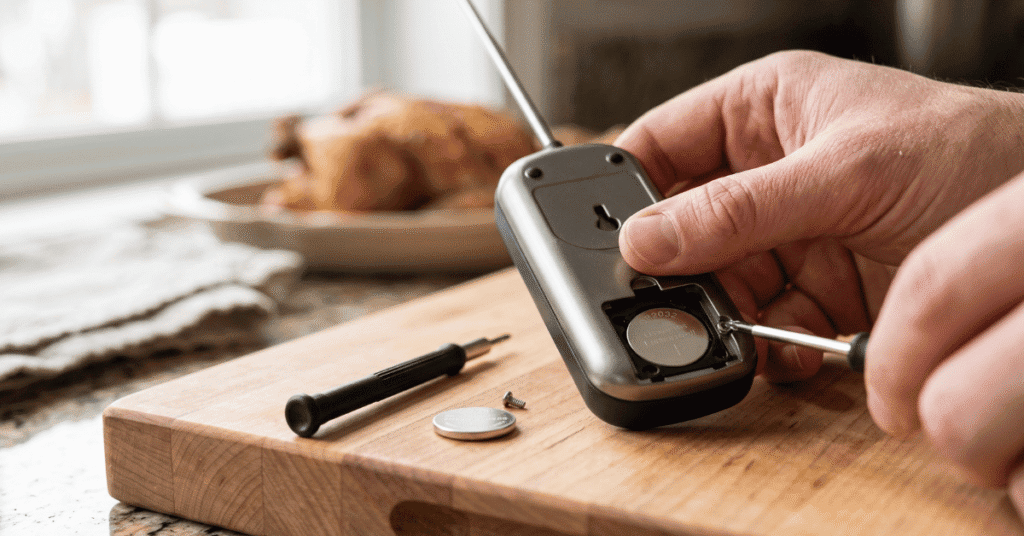
If there is a screw, turn it counter-clockwise until it’s loose. Make sure to keep the screw in a safe spot; they are notoriously easy to lose in a kitchen sink. If you’re using a coin, place it in the slot and turn it about 45 degrees toward the “open” or “unlocked” icon.

Once the door is off, you might need to give the thermometer a gentle tap against your palm to dislodge the battery. Some Taylor models have a small metal spring clip holding the battery down. Do not pry this clip with force.

Use a toothpick or a plastic tool to gently slide the battery out from under the tension arm.

Step 3: Identify the Correct Battery Type

Taylor doesn’t use one single battery size across the board. You must check the number engraved on the old battery.

  • CR2032: These are thin, wide lithium “coin” cells. They are very common in sleek, modern thermometers.
  • LR44 or AG13: These are smaller, thicker alkaline button cells often used in the pen-style thermometers.
  • AAA Batteries: Some larger remote-probe models use standard AAA alkaline batteries.

Do not try to force a battery that is “almost” the right size. An LR44 will not work in a slot designed for a CR2032, and using the wrong voltage can damage the thermometer’s circuit board.

Step 4: Insert the New Battery

The most common mistake when someone tries to change the battery in a Taylor meat thermometer is putting it in upside down. Button cells have a “plus” (+) side and a “minus” (-) side. The plus side is almost always the flat, shiny side with the text engraved on it.

In most Taylor devices, the plus side should face you (face up) as you put it into the compartment. If you see a small metal tab at the bottom of the compartment, that usually needs to make contact with the bottom of the battery, while the side clip touches the edge.

Step 5: Seal and Test

Snap the cover back on. If you used a coin-slot lid, make sure the tabs line up before you twist it back to the “locked” position. If it’s a screw-down door, tighten the screw until it’s snug, but don’t over-tighten, as the plastic threads can strip easily.

Turn the device on. If the screen is crisp and clear, you’re ready to cook. If it doesn’t turn on, reopen the hatch and ensure the battery isn’t sitting crooked.

A slight misalignment is enough to break the circuit.

Handling Specific Taylor Variations

Taylor has a huge catalog, so a few models have quirks. The Taylor 9842 digital pocket thermometer, for instance, has a top cap that you twist off. Sometimes the internal spring gets compressed over time.

If you put a new battery in and it still won’t turn on, gently stretch the small metal spring inside the cap just a tiny bit to ensure it hits the battery surface.

The Taylor 1470 series (the ones with the wire probe) often has the battery compartment behind the flip-out stand. If you can’t see the battery door, try moving the kickstand out of the way first. These models often use a single AAA battery, making them much easier to service in a pinch than the button-cell versions.

Waterproof and Splash-Proof Models

Some Taylor thermometers are rated as waterproof. These units have a rubber O-ring or gasket around the battery compartment to keep moisture out. When you change the battery in a Taylor meat thermometer with this feature, check the condition of that rubber ring.

If it’s dirty, wipe it clean. If it’s out of place, the thermometer will leak the next time you wash it or get caught in steam, which will instantly fry the electronics.

Common Mistakes to Avoid

Changing a battery seems simple, but these three errors cause the most “broken” thermometers:

  • Using a “Dead” New Battery: People often grab batteries from a “junk drawer” that have been sitting for years. Button cells lose their charge over time even when not in use. Check the “Best By” date on the packaging.
  • Touching the Battery Surfaces: Skin oils can create a film on button cells, leading to poor conduction. Try to hold the battery by the edges, or wipe it down with a clean cloth after you drop it into the slot.
  • Forcing the Door: If the battery door doesn’t close easily, the battery is likely not seated flat. Forcing the door will break the plastic clips, and once those are gone, the battery won’t stay tight against the contacts.

Frequent Asked Questions

What battery does a Taylor meat thermometer use?

Most Taylor digital thermometers use either a CR2032 lithium coin cell or one or two LR44 alkaline button batteries. Larger units with separate probes often use a single AAA battery. You can find the exact type printed on the back of the device or on the old battery itself.

Why is my Taylor thermometer showing “LO” after I changed the battery?

If the “LO” appears immediately, it usually means the thermometer is in its lowest sensing range (like air temperature) and is working fine. However, if the screen is flashing or the numbers are erratic, the new battery might be weak, or the probe might not be fully plugged into the base unit.

Can I use a generic brand battery in my Taylor thermometer?

Yes, generic brands like Energizer, Duracell, or even store labels work fine as long as the model number (e.g., CR2032) matches. There’s no need to look for a Taylor-branded battery, as the company doesn’t manufacture their own cells.

How long should the battery last in a digital meat thermometer?

With moderate use (a few times a week), a battery should last about 12 to 18 months. If you leave the device on frequently, or if it doesn’t have an auto-shutoff feature, you might need to change it every 6 months. Cold storage, like keeping the thermometer in a cold garage or outdoor kitchen, can also drain the battery faster.

Worth Remembering

Replacing the power source is the easiest way to revive a behaving thermometer. Most of the time, what looks like a broken sensor is just a lack of juice. If you’ve swapped the battery and the device still shows a wild temperature (like 300°F in a room-temperature kitchen), the issue is likely a damaged probe rather than the battery.

Keep a spare CR2032 or LR44 in your kitchen junk drawer. You don’t want to be halfway through a holiday roast only to realize you can’t check the internal temp. A two-minute battery swap ensures your meat is cooked perfectly and, more importantly, is safe for everyone at the table.

Leave a Comment