You pull the roast out of the oven, grab your trusted thermometer, and the screen is completely blank. The meat is resting, the clock is ticking, and you need a reading right now.
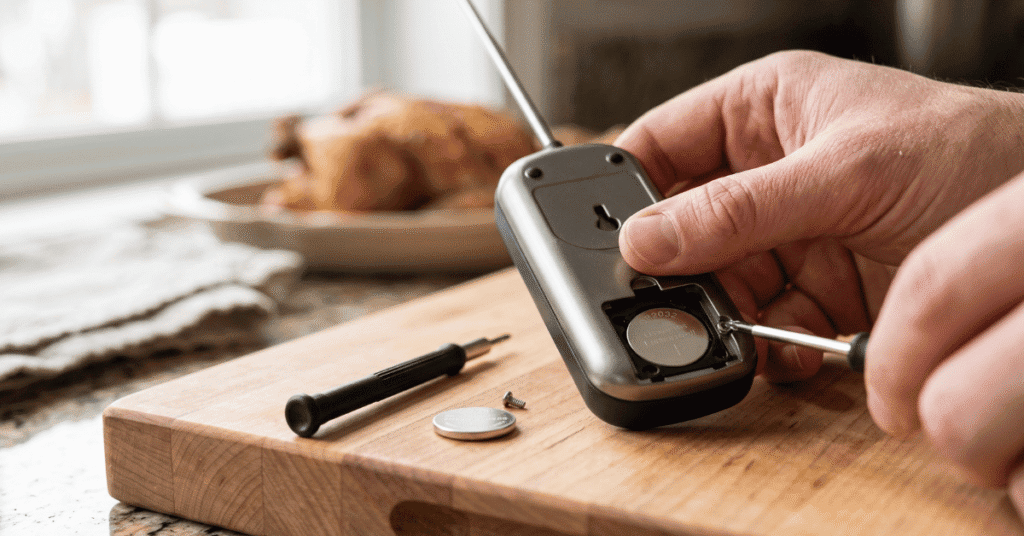
To learn how to change battery in Taylor meat thermometer in 2026, start by checking the back of the dial for the battery compartment. Twist the circular cover counter-clockwise with a small coin, or remove the tiny screw with a precision Phillips screwdriver. Take out the old battery and insert the new one (usually an LR44 or CR2032) with the positive “+” side facing you. Replace the cover tightly to seal out moisture.
Finding the right replacement battery
Before you open the device, you need the correct replacement cell. Taylor digital thermometers run on one of three common battery types.
Button and coin cells
Standard digital probe thermometers take a single 1.5-volt LR44 button battery. The folding-probe models run on a 3-volt CR2032 lithium coin battery. Check the back of the device. The required battery type is usually stamped directly into the plastic casing.
AAA batteries
Wireless and base-station Taylor models run on standard AAA batteries. These larger compartments use a standard plastic clip and open without tools.
Step-by-step: How to Change Battery in Taylor Meat Thermometer in 2026
1. Open the compartment For twist-off backs, place a small coin in the plastic groove and turn it counter-clockwise. For screwed backs, use a #0 or #1 Phillips screwdriver.
2. Remove the dead battery Carefully pry the old battery loose. A wooden toothpick easily pushes the battery out of a tight plastic slot without scratching the circuit board.
3. Insert the new battery Place the new LR44 or CR2032 battery into the slot. The side with the plus sign (+) faces up toward you.
4. Seal the cover Twist the cap clockwise or tighten the screw. The small rubber O-ring must sit perfectly flat against the plastic. This seal keeps meat juices and sink water away from the internal electronics.
[IMAGE: A person using a small coin to twist open the battery compartment on the back of a digital Taylor thermometer | alt: Opening the compartment to show how to change battery in Taylor meat thermometer in 2026]
What to check if the screen stays blank
A new battery sometimes fails to fix a blank screen. The metal contact tabs inside the battery compartment bend easily over time. If the battery sits loosely in the slot, gently pull the small metal tab upward so it touches the battery firmly.
Water damage causes similar problems. If moisture gets past the battery seal, the screen might look faded or display scrambled numbers. Leave the battery door open overnight in a dry place to clear trapped condensation.
[IMAGE: Close up of the metal battery contacts inside a digital meat thermometer | alt: Checking the metal contacts after learning how to change battery in Taylor meat thermometer in 2026]
Frequently asked questions
How do I know when my Taylor thermometer battery is low? The digital display will dim significantly, or the numbers will flash. Some newer models show a small battery icon on the screen. The thermometer might also take much longer than the standard 3 to 5 seconds to register a temperature.
Do I have to recalibrate my thermometer after a battery change? You usually keep your calibration settings during a quick battery swap. If the thermometer resets to factory defaults, test it in a glass of ice water. The screen should read 32°F (0°C).
Can I use an LR44 battery instead of an A76? Yes. LR44, A76, and AG13 are just different names for the exact same 1.5-volt alkaline button battery. You can use them interchangeably in your Taylor thermometer.
Are Taylor thermometers waterproof after you replace the battery? Most models are only splash-proof. They resist light moisture and damp towels. Washing the thermometer under running water or submerging it will force water past the battery door and break the device. Always wipe the probe clean with a soapy cloth to meet USDA temperature guidelines safely.
The bottom line
A blank thermometer screen is an easy fix that takes less than two minutes. Keep a spare LR44 or CR2032 battery in your kitchen drawer so you are ready for the next meal. Close the battery door tightly to protect the internal wiring from kitchen moisture.