Air fryer presets are preprogrammed buttons on the control panel that automatically set a specific temperature and cooking time for common foods like fries, chicken, or fish. The ones that genuinely matter are the high-heat options meant for starchy vegetables and breaded proteins, because those items follow predictable cooking curves. Presets for delicate foods like seafood or baked goods tend to miss the mark and need manual adjustments anyway.
If you just bought a new machine and see a row of icons staring back at you, knowing which air fryer presets actually save you time prevents a lot of burnt dinners. We'll cover how these buttons work under the hood, which specific food categories benefit from them, where they fall short, and how to adjust your approach when the default settings don't fit what's in your basket.
How Air Fryer Presets Calculate Time and Heat
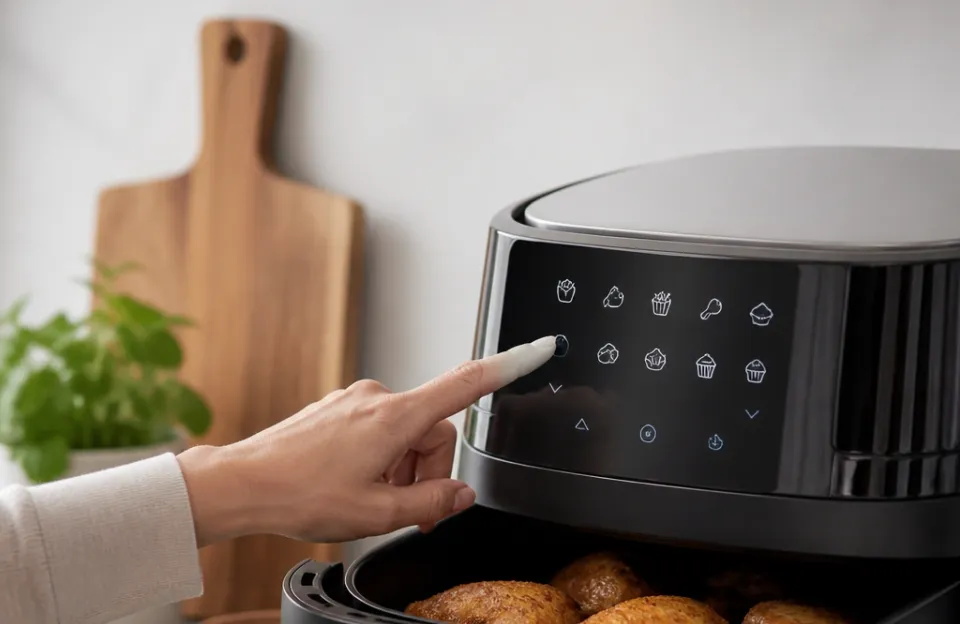
Every preset button on an air fryer is a stored combination of two variables: target temperature and total run time. When you press the poultry icon, the machine's circuit board reads a saved profile. It tells the heating element to reach a set degree, usually around 380°F to 400°F, and starts a countdown timer, often between 15 and 20 minutes.
The fan speed might also change depending on the model. Some brands ramp up the convection fan for crispier items and slow it down for baking modes. The logic behind these profiles comes from average testing done by the manufacturer using standard portion sizes.
They cook a typical batch of frozen french fries or a few average-sized chicken drumsticks, record the time and heat needed, and program that data into the chip.
Because these profiles rely on averages, they assume a specific starting point. They expect food taken straight from the refrigerator or a standard bag of frozen goods. If your ingredients differ in size, moisture content, or starting temperature, the preset will still execute its fixed program regardless.
That rigid behavior is why some presets work beautifully while others leave food raw in the center or scorched on the edges. Understanding this baseline helps explain why certain foods pair well with automated buttons and others demand manual dials. For a deeper look at how these countertop appliances evolved to include digital programming, checking their background clarifies why modern panels have so many options.
The Potato and Root Vegetable Settings That Get It Right
Starchy vegetables are the most forgiving category for automated cooking. Potatoes, sweet potatoes, and root vegetable chunks have dense structures that require sustained high heat to soften inside while browning outside. The "Fries" or "Potato" preset almost always targets 400°F for 15 to 20 minutes.
This combination works because starch needs that exact temperature range to undergo the Maillard reaction, which creates the brown, crispy exterior everyone expects.
Frozen french fries respond particularly well to this button. Since commercial frozen fries are par-cooked and uniformly cut before packaging, the manufacturer's preset aligns closely with the food's actual needs. You pour them in, press the button, shake the basket halfway through, and get consistent results.
Fresh cut potatoes require a bit more attention even when using the preset. If you cut your own wedges, they release more surface moisture than frozen ones. The preset timer might finish before that moisture evaporates completely, leaving you with soggy edges.
In practice, adding three to five extra minutes to the default potato cycle solves this. Knowing the right timing for fresh cuts takes the guesswork out of adjusting that default cycle. The preset gets you ninety percent of the way there, making it one of the most reliable buttons on the entire panel.
Why Poultry Buttons Work Better for Dark Meat Than Breasts
Chicken presets generally run between 375°F and 390°F for 18 to 25 minutes. This temperature band is ideal for dark meat like drumsticks, thighs, and wings. Dark meat contains more connective tissue and fat, which requires sustained heat to break down properly without drying out.
When you use the poultry setting for a batch of wings, the circulating hot air renders the fat effectively. Getting that deep golden crunch on wings relies heavily on maintaining steady heat, which the automated cycle provides without you hovering over the dial.
Boneless skinless chicken breasts present a different problem. They are lean and vary wildly in thickness. A preset designed for a 20-minute run at 380°F will likely overcook a thin breast while barely finishing a thick one.
The USDA requires all poultry to reach a safe internal temperature of 165°F, according to official food safety guidelines. Because the preset cannot measure internal temperature, it simply runs the clock.
For uniform pieces like nuggets or small bone-in drumettes, the poultry preset is highly practical. It removes the need to look up temperatures every time you cook a standard batch. But if you are working with irregular cuts, treat the poultry button as a starting suggestion rather than a guarantee.
You will still need a meat thermometer to confirm doneness. Adjusting the cycle slightly based on whether you use flour coatings or other dredges also changes how fast the outside browns compared to the inside cooking through.
Seafood Profiles and Their Narrow Margins for Error
Fish and shrimp presets exist on many digital models, usually programmed around 350°F to 370°F for 8 to 12 minutes. Seafood proteins denature very quickly. The window between perfectly cooked salmon and dry, chalky fish is often less than two minutes.
This narrow margin makes seafood presets the least reliable option on the control panel.
A preset does not know if you are cooking a thin tilapia fillet or a thick salmon steak. If you press the fish button for a thick cut of salmon, the default 10-minute cycle might leave the center translucent. Figuring out exactly how long thicker cuts need prevents you from relying blindly on the factory setting.
Conversely, using that same button for small shrimp will result in rubbery, overcooked meat by the time the timer goes off.
Shrimp presets suffer from the same issue. Small peeled shrimp cook in four to five minutes at 400°F. If the machine defaults to a longer cycle at a lower temperature, the texture degrades rapidly.
I think the seafood preset is only useful if you cook the exact type and size of fish the manufacturer tested during development. For everything else, manually setting the temperature and watching the clock yields much better meals. Using the preset for delicate proteins often leads to frustration, which is why many experienced users ignore the fish icon entirely.
Bacon, Sausage, and High-Fat Cooking Shortcuts
High-fat meats generate significant smoke and grease splatter during cooking. Presets labeled "Bacon" or "Meat" typically lower the temperature to around 350°F and extend the time slightly. This slower approach allows fat to render gradually instead of smoking immediately upon hitting a 400°F heating element.
Bacon presets work reasonably well for standard sliced strips. The lower temperature prevents the sugar in cured bacon from burning before the fat melts away. However, thick-cut bacon holds more moisture and fat, meaning the standard preset might finish with limp strips instead of crispy ones.
Finding the right duration for thicker slices means you can let the machine handle the heat while you tweak the clock.
Sausages behave similarly. Pre-cooked links just need heating and browning, making the meat preset a convenient shortcut. Raw sausages need to reach safe internal temperatures without splitting their casings from aggressive heat.
The moderate temperature of the meat preset handles this balance adequately for average-sized links.
One limitation with any high-fat preset is the lack of smoke management. No button changes the physical reality of dripping grease hitting a hot metal surface. Even if the preset lowers the temperature, you may still need to add a splash of water to the bottom drawer to prevent smoking, something the automated program cannot do for you.
| Food Category | Typical Preset Temp | Typical Preset Time | Reliability Rating | Best Used For |
|---|---|---|---|---|
| French Fries / Potatoes | 400°F | 15 to 20 min | High | Frozen fries, uniform fresh cuts |
| Poultry (Dark Meat) | 380°F | 18 to 25 min | Medium-High | Wings, drumsticks, thighs |
| Poultry (White Meat) | 380°F | 18 to 25 min | Low | Only uniform, boneless pieces |
| Fish / Seafood | 360°F | 8 to 12 min | Low | Exact sizes matching factory tests |
| Bacon / Sausage | 350°F | 10 to 15 min | Medium | Standard thickness, pre-cooked links |
| Bake / Pastry | 320°F | 20 to 30 min | Low | Reheating, not raw dough |
The Baking Mode Limitation Most People Overlook
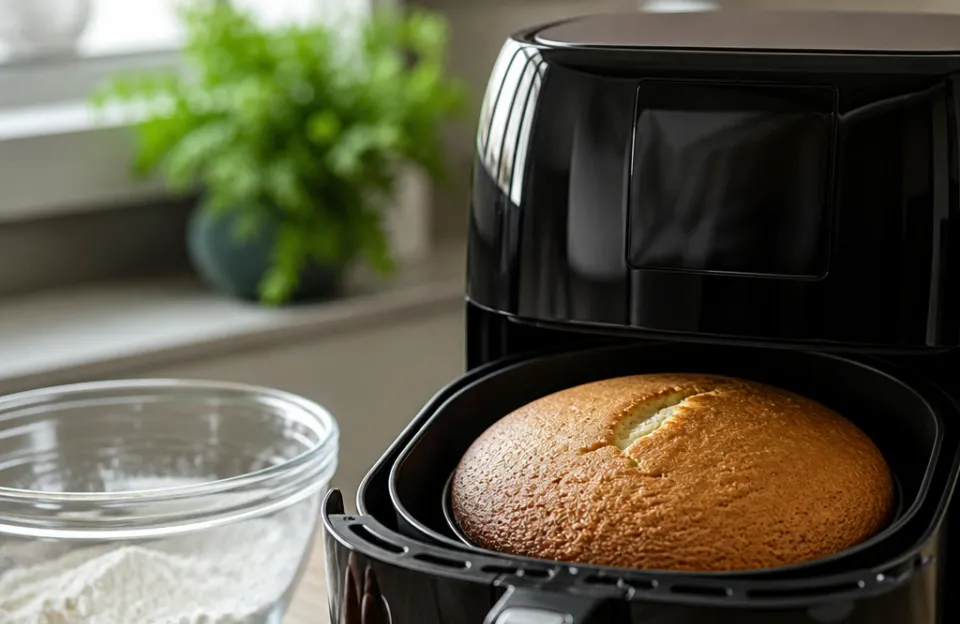
Many air fryers include a "Bake" or "Cake" preset, dropping the temperature to 320°F or 330°F and running for 20 to 30 minutes. This setting attempts to mimic a conventional oven for muffins, cookies, or small cakes. The fundamental issue is airflow.
Convection fans in air fryers move air much faster than standard ovens. This intense circulation blows lightweight batters sideways, creates lopsided tops on muffins, and dries out cookie edges before the centers set.
The bake preset matters very little unless you are reheating pastries or melting cheese on top of a casserole. For actual raw dough or batter, the rapid air movement works against the chemistry of baking. You will get better results by manually lowering the temperature even further than the preset suggests and covering the food loosely with foil to block the direct fan force.
Some higher-end models address this by reducing fan speed during the bake cycle. If your machine has variable fan speeds tied to its presets, the baking button becomes slightly more viable. But for the majority of basket-style fryers, treating the appliance as a true oven using the bake preset leads to uneven, dry results.
Stick to roasting and frying tasks where the aggressive air circulation is an advantage.
Manual Overrides Beat Factory Defaults Every Time
Understanding which air fryer presets matter gives you a baseline, but learning to override them gives you control. Every digital interface allows you to press a preset and then use the plus or minus arrows to adjust the time and temperature before hitting start. This hybrid approach is the most effective way to use the machine.
Start by pressing the preset closest to your food. Look at the temperature it selected. If you are cooking something thicker than average, drop the temperature by 10 or 15 degrees and add five minutes to the timer.
Lower heat penetrates dense foods without burning the exterior. If your food is thinner or smaller than average, raise the heat slightly and cut the time.
This adjustment process applies heavily to dense items like meatloaf. A standard meat preset might blast the outside while leaving the center pink. Dropping the heat manually while keeping the automated base time ensures thorough cooking.
Checking guides for properly timing heavier dishes shows exactly why factory cycles need tweaking for larger volumes.
Another reason to override presets is altitude and voltage. Machines tested at sea level in a factory perform differently in high-altitude kitchens where water boils at lower temperatures. A slight manual increase in time compensates for environmental differences the microchip cannot detect.
Treating presets as suggestions rather than absolute rules transforms how consistently your food turns out.
Hardware Differences Between Popular Brands
Not all preset buttons trigger the same actions across different machines. A budget brand might simply lock in a time and temperature when you press the chicken icon. A premium model might alter the wattage output of the heating element or pulse the fan on and off to simulate different cooking methods.
When looking at popular models like specific Ninja configurations, you will notice their preset algorithms tend to run slightly hotter than competitors. This design choice favors browning and crisping, which matches consumer expectations for fried foods. Other brands, such as Cuisinart's oven-style designs, distribute heat differently due to their wider racks, meaning their presets account for greater air volume.
Basket style versus oven style is the biggest divider. Basket fryers concentrate heat in a tight cylinder. Their presets reflect this intensity.
Oven-style units with multiple racks have dead zones and cooler spots. A "Roast" preset on a multi-rack unit might run longer and hotter than the same word printed on a compact basket model. Knowing your specific hardware's tendencies prevents you from trusting a generic icon blindly.
Reading reviews of specialized glass models highlights how material and shape alter the way these automated programs deliver heat. Always run a test batch with a new machine before trusting its presets for a large dinner.
Common Mistakes When Relying on Automated Programs
People run into trouble with presets by ignoring a few basic physics principles. The machine executes code; it doesn't see your food.
- Overcrowding the basket after pressing a button. Presets calculate heat distribution for a single layer of food. If you pile potatoes to the rim and hit the fry button, the center stays cold while the top burns. The timer finishes, but the food isn't done.
- Skipping the preheat phase. Many presets begin their countdown immediately. If the heating element starts cold, the first three minutes of the cycle are spent warming up, effectively shortening your actual cook time.
- Ignoring the shake reminder. Some models beep halfway through a preset to remind you to agitate the basket. Dismissing this beep means the bottom layer steams in trapped moisture instead of crisping.
- Using the meat preset for wet batters. Dripping wet batter needs oil submersion to set. Pressing a preset for battered fish in an air fryer just blows the liquid coating off the protein and onto the heating element.
- Assuming all chicken parts cook identically. Pressing the poultry button for a mix of thick thighs and thin wings guarantees one will be underdone while the other dries out. Sorting by size before selecting the preset avoids this mismatch.
Frequently Asked Questions
Do air fryer presets adjust the fan speed?
On basic models, presets only change the target temperature and the timer duration. The fan runs at a single constant speed. Higher-end machines sometimes program the fan to pulse or slow down during specific presets, like a "dehydrate" or "bake" mode, to prevent blowing lightweight food around or drying it out too aggressively.
Can I pause a preset halfway through to check my food?
Yes. Pulling the basket out triggers a safety switch that pauses the heating element and the fan immediately. You can check the color, shake the contents, or remove smaller pieces that finished early.
Sliding the basket back in resumes the remaining countdown exactly where it stopped.
Are the time and temperature settings the same across all brands?
No. One brand's "Fries" preset might run at 400°F for 15 minutes, while another sets it at 390°F for 18 minutes. Manufacturers develop these profiles based on their own internal testing using their specific heating elements and basket geometries.
Always check your user manual for the exact numbers programmed into each icon.
Should I trust the seafood preset for expensive cuts of fish?
It is safer to cook expensive seafood manually. The margin for error with fish is incredibly small, and a preset cannot measure the thickness of your specific fillet. Set the temperature yourself, start with a shorter time than you think you need, and check the flakiness with a fork to avoid ruining a costly piece of salmon or halibut.
Why did my food burn even though I used the correct preset?
Presets assume standard portion sizes and typical moisture levels. If your food was cut smaller than average, coated in sugar-heavy marinades, or placed in a machine that runs naturally hot, the default time will overcook it. Sugar caramelizes and burns rapidly above 370°F, making sweet glazes particularly risky on standard high-heat cycles.
Is it better to use presets or set the dials manually?
Presets are excellent starting points for common foods like frozen fries or standard chicken pieces because they eliminate memorization. However, manual settings give you the precision needed for unique recipes, irregular cuts, or delicate items. The best approach is using the preset to load the base temperature, then manually tweaking the time up or down based on what you are actually cooking.
Before You Start Your Next Batch
Air fryer presets save mental energy when you are cooking familiar, uniform foods. The buttons dedicated to potatoes, frozen snacks, and standard poultry cuts earn their place on the control panel because those items react predictably to fixed heat and time combinations. Presets for delicate proteins, baking, or irregular cuts rarely match the nuance required for good results.
Treat the icons as a rough draft. Load the preset, glance at the numbers it chose, and adjust the dial to fit the exact size and moisture of the food sitting in your basket.