When you're shopping for touchscreen air fryers, what to consider comes down to screen responsiveness, interface clarity, capacity, and how the digital controls handle grease and heat over time. A glass panel looks clean on the counter, but it changes how you interact with the machine compared to physical dials.
Touchscreen air fryers replace traditional knobs and mechanical buttons with a flat digital display. You tap icons or slide bars to set temperatures and cooking times. The main trade-off is between a modern, easy-to-clean surface and the tactile feedback of physical controls.
If you cook frequently or have mobility concerns in your hands, the type of screen matters just as much as the wattage or basket size. This guide covers the specific details that separate a good digital interface from a frustrating one, along with the hardware specs that need to match it.
How Touchscreen Air Fryers: What to Consider Changes Your Cooking Routine
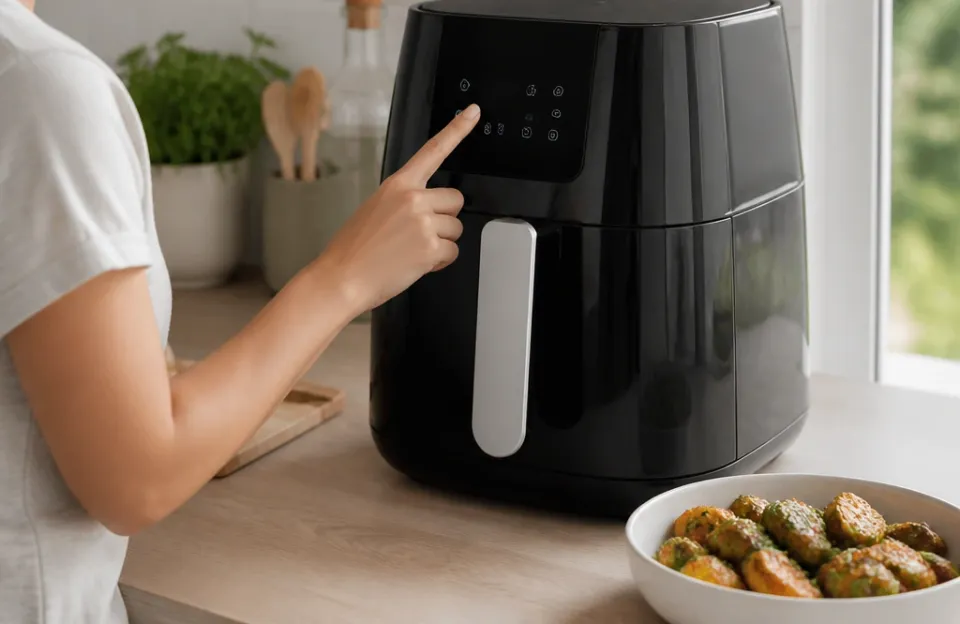
A touchscreen interface changes how you program your meals. Instead of turning a dial until you guess the right temperature, you tap exact numbers. Most models let you adjust the heat in 5-degree increments rather than the 10- or 25-degree jumps common on analog machines.
That precision helps when you are timing root vegetables that burn easily at high heat.
The screen also houses preset programs. These are pre-calculated time and temperature combinations for foods like fries, chicken, or fish. You press one icon, and the machine does the rest.
Presets save time if you cook the same meals weekly. They remove the guesswork from getting poultry skin crispy without drying out the meat underneath.
Digital displays show countdown timers clearly. On a mechanical dial, you have to watch the tick marks move. On a screen, large digits tell you exactly how many minutes remain.
Some units even pause automatically when you pull the basket out to shake the food, resuming the timer when you push it back in.
Screen Type and Responsiveness Under Kitchen Conditions
Not all touchscreens react the same way to your fingers. Manufacturers use two main types of technology in kitchen appliances: capacitive and resistive.
Capacitive screens are the same type used on smartphones. They detect the electrical charge from your skin. They respond to a light tap and support multi-touch gestures, like swiping to scroll through presets.
The downside is they struggle with wet or greasy fingers. If you just handled raw meat or washed vegetables, a capacitive screen might ignore your taps or register phantom touches.
Resistive screens rely on physical pressure. Two flexible layers press together when you push them. They work perfectly with wet hands, greasy fingers, or even a wooden spoon tip.
The trade-off is they require a firmer press. They don't support swiping, so you navigate by tapping distinct arrows or plus and minus signs.
For an air fryer sitting next to a stove where splatter happens, a resistive screen often proves more reliable day to day. Capacitive screens look sleeker and feel faster, but only when your hands are completely dry.
| Screen Type | Activation Method | Works With Wet Hands | Swipe Support | Durability Against Scratches |
|---|---|---|---|---|
| Capacitive | Electrical charge | Poor | Yes | High (glass surface) |
| Resistive | Physical pressure | Excellent | No | Moderate (plastic film) |
Interface Layout and Readability Across Brands
A screen is only useful if you can read it while standing over a hot appliance. Look at the contrast ratio. White text on a black background usually reads better under bright kitchen lights than pale gray text on white.
Icon design varies wildly between brands. Some use clear pictures of a drumstick or a fish fillet. Others use abstract shapes or letters that mean nothing until you read the manual.
Good interfaces label everything in plain text next to the icon. If a model relies entirely on symbols without words, expect a learning curve every time someone new uses it.
Font size matters too. The temperature and timer should be the largest elements on the display. Secondary functions, like adjusting fan speed or setting a delay start, can be smaller.
When you check progress from across the room, you need to see those primary numbers instantly.
Some manufacturers group controls logically. Temperature sits on the left, time on the right, and presets run along the bottom. Others scatter buttons randomly.
Before buying, look at photos of the powered-on display, not just the dark glass.
Built-In Programs Versus Manual Control Options
Presets sound convenient, but they aren't always accurate for your specific ingredients. A "fries" button assumes a certain thickness and moisture level. If you cut your potatoes thicker than the manufacturer tested, the preset will leave them raw in the center.
The best touchscreen models let you edit the presets. You tap the fries icon, then manually bump the time up by three minutes before hitting start. Cheaper units lock you into the factory settings.
Once you press the icon, the machine runs its fixed cycle.
Manual mode is mandatory for serious cooks. You need the ability to set any temperature within the machine's range and any time up to its maximum limit. Check whether the touchscreen allows you to switch between Fahrenheit and Celsius.
Some imported models lock you into one scale.
If you frequently prepare seafood, knowing how long delicate fillets need requires precise manual control. Presets rarely account for the thickness variation in fresh cuts.
Cleaning Glass Panels Without Damaging the Sensors
Grease vaporizes during air frying and settles on every nearby surface, including the control panel. Touchscreens collect fingerprints and oil mist constantly.
Never spray cleaner directly onto the display. Liquid seeps into the bezel edges and shorts the electronics behind the glass. Spray a microfiber cloth first, then wipe the screen gently.
Use mild dish soap diluted in water or a dedicated electronics wipe. Avoid ammonia-based glass cleaners. Ammonia degrades the anti-glare coatings some manufacturers apply to these panels.
Resistive screens have a softer top layer. Scrubbing them with abrasive sponges leaves permanent scratches that make reading the display harder over time. Stick to soft cloths.
How often you clean depends on what you cook. Frying bacon produces heavy smoke and grease. Wiping the panel after rendering strips properly prevents sticky buildup that interferes with touch sensitivity.
Capacity Matching for Digital Models
Touchscreen models tend to skew toward mid-size and large capacities. Manufacturers put digital panels on their premium lines, which usually means 4 to 8 quarts. Smaller 2-quart personal fryers often stick to mechanical dials to keep costs down.
Match the capacity to your household size. A 4-quart basket fits two portions of protein and a side. A 6-quart handles a family of four.
An 8-quart works for meal prep or larger gatherings.
Don't buy a massive unit for one person hoping the touchscreen justifies the footprint. Larger baskets take longer to preheat. They consume more electricity.
The screen experience is identical whether the machine holds 4 or 8 quarts.
If counter space is tight, look for vertical designs. Some touchscreen models stack the heating element directly above a tall, narrow basket rather than spreading out horizontally. This reduces the footprint while keeping the display angled upward for easy reading.
Wattage, Heat Output, and Circuit Load
Digital controls draw minimal power themselves. The heating element and fan consume almost all the electricity. Most touchscreen air fryers run between 1500 and 1800 watts.
A 1800-watt machine pulls 15 amps on a standard 120-volt US circuit. That is the entire capacity of a typical kitchen outlet. If you run the microwave or coffee maker on the same circuit simultaneously, the breaker trips.
Check your kitchen wiring before plugging in a high-wattage digital model. Older homes often share circuits between multiple outlets. Newer builds usually dedicate circuits to major countertop zones.
Higher wattage means faster preheating and better browning. Lower wattage saves energy but extends cooking times. The touchscreen won't change the physics of heating, though it will display the exact temperature recovery after you open the basket.
Noise Levels From Fans Behind the Display

Air fryers use high-speed fans to circulate hot air. Touchscreen models sometimes pack more powerful fans because the digital interface signals a higher-end build. More airflow means louder operation.
Expect noise levels between 50 and 65 decibels. That ranges from a quiet conversation to a running dishwasher. The fan runs continuously during the cooking cycle.
Some models pulse the fan speed based on the selected program, creating a varying hum.
Where the exhaust vents matters. Rear-venting units push hot air against the wall. Top-venting models blow steam upward, which can damage low-hanging cabinets over time.
The touchscreen placement usually dictates the vent location. Front-facing screens often force vents to the back or sides.
If you cook late at night or have an open-concept living space, check user reports about noise. Specifications rarely list decibel ratings honestly.
Safety Protocols and Thermal Protection Standards
Any appliance combining electricity, heat, and digital logic needs proper safety certifications. Look for marks from recognized testing laboratories like UL or ETL. These organizations verify that the internal wiring, thermal cutoffs, and grounding meet strict requirements.
You can review general appliance safety guidelines through the Consumer Product Safety Commission to understand what these certifications cover.
Thermal fuses prevent fires if the main thermostat fails. Auto-shutoff turns the machine off when the timer hits zero or when the basket is removed. Overheat protection monitors the internal temperature near the electronics.
Touchscreens generate their own minor heat, and the processor behind the glass adds to the thermal load inside the housing.
Cool-touch exteriors matter more with digital units. Because there are no protruding knobs to grab, users naturally reach for the top or sides to steady the machine while pulling the heavy basket out. If those surfaces get dangerously hot, burns happen quickly.
Child locks exist on some touchscreen models. Since a flat panel responds to any touch, a toddler leaning against the counter could accidentally start the heating element. A lock sequence requiring two simultaneous presses prevents this.
Reliability Concerns Specific to Touch Controls
Mechanical dials rarely fail completely. They might become stiff or lose calibration, but they still turn. Touchscreens introduce electronic failure points.
Moisture intrusion is the primary killer. Steam escaping from the basket during cooking rises toward the control panel. If the seal around the glass isn't tight, condensation forms on the circuit board behind the screen.
This causes erratic behavior, dead zones on the panel, or total failure.
Power surges can fry the logic board controlling the display. Unlike a simple bimetallic thermostat in a dial model, a touchscreen requires a microprocessor. Plugging the unit into a surge protector adds a layer of defense.
Software glitches occasionally freeze digital interfaces. Unplugging the machine for five minutes resets the processor. This is annoying mid-cook but rarely indicates permanent damage.
Replacement parts for proprietary screens are expensive. If the display cracks or dies out of warranty, repair costs often approach the price of a new unit. Standardized components are rare in this category.
Price Differences Between Digital and Analog Units
Touchscreen air fryers cost more than their dial-operated equivalents. The glass panel, the underlying digitizer, and the microprocessor add manufacturing expense. Expect to pay 20 to 40 percent more for a digital version of the same capacity and wattage.
Budget models under $60 rarely include quality touchscreens. They might use cheap resistive panels with poor viewing angles or slow response times. Mid-range options between $80 and $150 offer the best balance of screen quality and cooking performance.
Premium units above $150 add Wi-Fi connectivity, app integration, or dual-zone baskets alongside high-resolution displays.
Consider whether the digital precision justifies the extra cost for your habits. If you mostly reheat leftovers or cook frozen snacks, a mechanical timer works fine. If you experiment with different temperatures for various proteins, the digital investment pays off.
For example, achieving the right texture when prepping wings ahead of time benefits greatly from exact temperature staging that dials cannot provide.
Smart Connectivity and App Integration Trade-offs
Many touchscreen air fryers now connect to home Wi-Fi networks. Companion apps let you send recipes directly to the machine, monitor progress from another room, or receive push notifications when food is done.
This sounds convenient until the network drops. If the app loses connection mid-cycle, some models pause cooking while others continue normally. Relying on a phone to operate a kitchen appliance introduces unnecessary complexity for a simple task.
Firmware updates are another factor. Smart screens receive software patches. Occasionally, an update changes the menu layout or alters how presets function.
Mechanical dials never change their behavior overnight.
Privacy considerations exist too. Connected appliances collect usage data. Check the manufacturer's policy regarding what information transmits back to their servers.
If you prefer keeping your cooking habits offline, choose a touchscreen model without wireless radios.
Space Requirements and Ventilation Clearances
A flat glass front doesn't mean the machine fits anywhere. Touchscreen models still require adequate airflow around the exhaust vents. Blocking these vents causes overheating, which triggers safety shutoffs or damages the screen electronics.
Manufacturers specify clearance distances in the manual. Usually, you need 5 inches behind the unit and 4 inches on each side. Never push a digital air fryer flush against a backsplash.
Cabinet height matters. The steam rising from the basket carries heat and grease particles. Placing the fryer directly under low wooden cabinets warps the finish over months.
Allow at least 8 to 10 inches of vertical clearance above the exhaust path.
Storage is trickier with glass fronts. Stacking other items on top risks cracking the display. Dial models tolerate a cutting board resting on them; touchscreens do not.
Plan for dedicated counter space or a shelf where nothing rests on the lid.
Frequently asked questions
Do touchscreen air fryers work if my hands are wet?
It depends on the screen technology. Capacitive screens, which feel like smartphone glass, struggle with water droplets and may miss your taps. Resistive screens require physical pressure and work perfectly with wet or greasy hands.
Check the product specifications to confirm which type the model uses before buying.
Are digital presets accurate for all food sizes?
Presets are calibrated for average portion sizes and standard grocery store cuts. Thick-cut steaks, unusually large potatoes, or densely packed baskets will deviate from the programmed results. Always treat presets as starting points and adjust the time manually based on what you are actually cooking.
Can I replace a cracked touchscreen panel myself?
Generally, no. The glass digitizer bonds directly to the LCD or LED display beneath it, and both connect to a proprietary logic board. Sourcing the exact replacement part is difficult outside of official service centers.
Repair costs frequently exceed half the original purchase price, making replacement the more practical option.
Do touchscreen models consume more electricity than dial versions?
The screen itself draws negligible power, typically less than 2 watts. Total consumption depends entirely on the heating element wattage and fan motor. A 1700-watt touchscreen model uses the same electricity as a 1700-watt mechanical model.
The interface type does not affect your utility bill.
Is it safe to leave a smart air fryer connected to Wi-Fi constantly?
Leaving it connected poses minimal physical risk, provided the appliance has standard thermal protections. However, it keeps the device accessible on your local network. If security concerns you, disable the Wi-Fi function in the settings menu and use the touchscreen manually.
This removes any remote access vulnerabilities while retaining full functionality.
Why does my touchscreen register taps when I am not touching it?
This phenomenon, called ghost touching, usually stems from grease buildup on the glass surface or moisture trapped beneath the bezel. Clean the panel thoroughly with a dry microfiber cloth first. If the problem persists, steam may have compromised the digitizer seal, indicating internal damage that requires professional evaluation.
Deciding If Digital Controls Fit Your Kitchen
Choosing among touchscreen air fryers means weighing convenience against durability. The glass interface gives you exact temperatures, readable timers, and simple cleanup when maintained correctly. It demands dry hands for capacitive models, careful cleaning routines, and respect for ventilation clearances that older dial units forgave.
If you value precision and a modern aesthetic, the digital route makes sense. Just verify the screen type matches your cooking style. A messy cook who handles raw proteins constantly will appreciate a pressure-sensitive resistive panel far more than a sleek smartphone-style display.
Match the technology to your actual daily habits, and the upgrade pays off every time you use it.