To clean a food scale, turn it off, brush away loose crumbs, and wipe the platform with a clean, lightly damp cloth. Use mild dish soap only where the manual allows it, remove any soap with a second lightly damp cloth, then dry the surface and seams. Keep water out of the display, buttons and battery compartment. Wash a removable platform separately only if the manufacturer permits it.
How to Clean a Food Scale: Quick Steps
- Check the model: Find its cleaning instructions before removing a platform or choosing a cleaner. A stainless steel top is not automatically removable or dishwasher-safe.
- Switch off and disconnect: Unplug any power or charging cable. Remove user-replaceable batteries if the manual directs; do not open a sealed rechargeable unit.
- Remove crumbs: Use a soft, dry brush around the outside edges without pushing debris into gaps or pressing on the weighing mechanism.
- Wipe gently: Dampen the cloth, not the scale. Start with water; use a small amount of mild dish soap only on surfaces for which the manual allows it.
- Remove residue and dry: Wipe away permitted soap with a clean, lightly damp cloth. Dry exposed surfaces and let remaining moisture evaporate before reconnecting power.
- Check before using: Put the dry scale on a hard, level surface, turn it on and confirm that the empty platform returns to zero.
These are routine cleaning steps, not a substitute for sanitizing a surface contaminated by raw meat juices. For that situation, follow the food-contact guidance below and your scale’s instructions.
Cleaning a food scale takes only a few minutes, and consistent storage prevents the most common causes of failure: cracked screens, sticky buttons and damaged load cells. The process is simple, but skipped steps lead to inaccurate readings or moisture damage inside the electronics.
Fixed or Removable Platform? Check Your Model First
Two scales from the same brand can require different cleaning methods. These OXO manuals show why you should identify the exact model instead of treating every glass or stainless steel scale alike.
| Platform and example | What the official manual permits | What to avoid |
|---|---|---|
| In-place cleaning: OXO Good Grips 11 lb Glass Food Scale with Pull-Out Display | Wipe the glass platform with a damp cloth. The cleaning instructions do not direct you to remove it. | Running the scale under water or putting it in a dishwasher. |
| Removable platform: OXO Good Grips 22 lb Food Scale | Lift and pull off the stainless steel platform for hand washing; align its tabs with the holes in the base when replacing it. | Putting either the platform or the base in the dishwasher. |
Sources: OXO 11 lb glass-scale care instructions and OXO 22 lb scale manual, removable platform and care sections. These examples apply to those models; check the instructions for yours.
For a fixed platform, clean it in place. Do not pry up the top or twist it to see whether it comes off. If your scale has an IP water-resistance rating, follow its cleaning instructions as well; the rating alone is not permission to rinse, submerge or put the scale in a dishwasher. If the manual gives no washing permission, use the wipe-only method.
Power Down and Prepare
Turn the scale off and unplug any adapter or charging cable before cleaning. If the manual calls for removing user-replaceable batteries, take them out as directed. Do not open a sealed battery compartment or the sensor housing.
If the scale is hot from being near the stove, move it away from the heat and let it reach room temperature. Keep the plug, charging socket and battery compartment dry throughout cleaning; do not clean the scale while it is charging.
Supplies That Won’t Damage the Load Cell
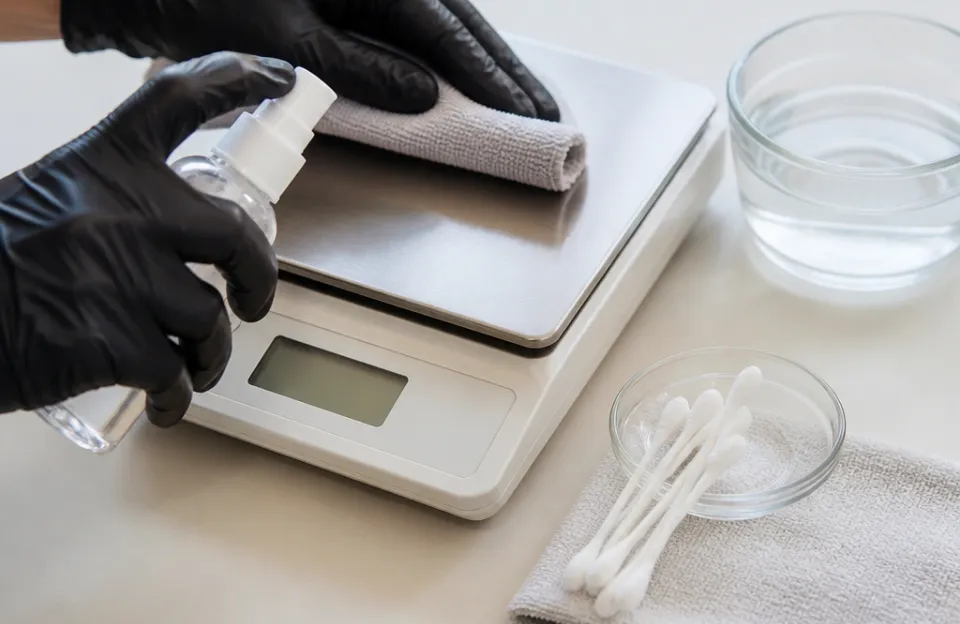
You don’t need specialized products. Standard household items work well as long as you avoid abrasives and heavy saturation.
- Microfiber cloths: Two are ideal. One slightly damp for washing, one completely dry for finishing.
- Mild dish soap, if permitted: Use only on parts and surfaces whose care instructions allow it; do not assume the display coating tolerates the same cleaner as a removable metal tray.
- Cotton swabs: These reach crumbs trapped around button edges or under removable platforms.
- The model’s approved cleaner, if needed: Do not use alcohol, bleach or disinfecting wipes unless the manufacturer permits that product on the particular surface.
- Soft-bristled brush: A clean, dry toothbrush dislodges dried flour or sugar from crevices.
Use a soft, non-abrasive cloth on the display. Avoid scouring powders, solvents and household cleaners that the manufacturer has not approved. Never mix cleaning products or spray them into seams.
Abrasive tools such as steel wool and rough sponges are also risky: scratches can disrupt touch sensitivity and give grime a place to collect. Never touch, spray or direct compressed air against the cover of the load cell, and never disassemble the weighing platform beyond what the manual instructs.
Wiping Down the Weighing Platform After Each Use
Daily maintenance prevents the buildup that later requires scrubbing. Wipe the scale immediately after you finish measuring ingredients, because dried dough, melted sugar and spilled oils bond to the surface quickly.
Turn the scale off first. An active screen responds to the pressure of your wiping hand, causing numbers to flash or triggering error codes. Powering down also reduces the chance that moisture reaches the electronics through button gaps.
Dampen your microfiber cloth with plain water and wring it out until it feels barely moist. Moisten the cloth, not the scale itself, so no water pools on the surface. Wipe the entire platform in smooth strokes, paying attention to the edges where the weighing tray meets the base.
Follow immediately with the dry cloth. Leaving moisture on the surface invites mineral deposits from hard water, which look like cloudy spots on dark plastic.
If Raw Meat Juices Reach the Scale
Keep raw meat or poultry in a separate, washable bowl or tray and tare the container before weighing. If juices spill onto the scale, cleaning and sanitizing are separate tasks. CDC’s cleaning and sanitizing guidance says to clean first and to follow the manufacturer’s cleaning instructions for electronics. A countertop sanitizing method is not automatically suitable for a food scale.
Use a sanitizer only if its food-contact label and the scale manufacturer’s instructions permit it on that part. Follow the specified concentration, wet contact time, rinsing and drying directions. Never flood the scale to meet a sanitizer’s contact time, or assume rubbing alcohol is a universal food-contact sanitizer. If the approved method is unclear, ask the scale maker before using that contaminated surface for food again.
Removing Dried Dough and Sticky Residue Safely
Sometimes a quick wipe isn’t enough. Flour mixed with water turns into paste, and honey dries hard.
When you face stuck-on messes, patience beats force. Pressing hard on the platform bends the load cell underneath and can ruin calibration.
Hold a lightly damp cloth against residue on the intact platform, keeping it clear of edges, buttons and seams. Lift loosened food away gently and repeat rather than leaving a wet cloth on the scale or pressing hard on the platform.
For sticky spills that resist water, use a small amount of mild soap only if the surface instructions allow it, then remove the soap with a clean, lightly damp cloth and dry. If that fails, check with the manufacturer before using a solvent. Do not chip hardened food off with a knife or other sharp tool.
If a spill reaches beyond the platform, clean the entire affected area before weighing another ingredient. Placing a small silicone mat or parchment liner on the platform before measuring sticky ingredients also makes cleanup easier: tare the scale to zero with the liner in place.
Cleaning the Buttons and Display Screen
Buttons collect grease from fingertips. Over weeks, that oil attracts dust and flour, creating a grimy ring around each key, and sticky buttons can fail to register presses.
First use a dry cotton swab or soft brush around the outside of each button. If the manual permits damp cleaning there, use a barely damp swab on the surface and dry it immediately. Do not work liquid underneath a key or pry it off.
Use a dry microfiber cloth for routine display dusting. For fingerprints, follow the display-cleaning instructions for your model; if a lightly damp cloth is permitted, use it without wetting the bezel, then dry.
Never spray cleaner directly at the screen. Liquid runs down the glass and pools in the bottom bezel, where it can reach the display connections.
| Cleaning area | Tool | Cleaning approach | What to avoid |
|---|---|---|---|
| Fixed weighing platform | Soft cloth | Lightly damp wipe; mild soap only if permitted | Submerging or pooling liquid at edges |
| Sticky spills | Lightly damp cloth | Soften gently; use only an approved cleaner if needed | Sharp scraping tools or unapproved solvents |
| Buttons and edges | Dry soft brush or swab | Dry first; damp cleaning only where the manual permits | Pushing liquid or debris under keys |
| Display screen | Microfiber cloth | Dry wipe, then the model’s permitted method for marks | Sprays, abrasives or unapproved screen cleaners |
| Removable trays | Soft cloth or non-abrasive sponge | Separate washing only as directed; dry before reassembly | Dishwasher unless explicitly permitted |
Handling Removable Trays and Silicone Mats
Remove a weighing platform only when the manual identifies it as user-removable. A visible seam around a glass or metal top does not prove it is detachable. The OXO 22 lb example above is removable; its instructions do not apply automatically to another OXO model.
Follow the manual’s release and reattachment directions rather than forcing the platform. Hand-wash a permitted tray separately, rinse off detergent and dry it completely before reattaching it. Removability does not mean dishwasher-safe: OXO explicitly excludes both the 22 lb model’s platform and its base from the dishwasher.
Placing a wet tray back on the base traps moisture against the sensor housing. Silicone mats or bowls used for taring should be washed separately, and the underside should be checked for trapped crumbs before it goes back on the scale.
If your scale has a fixed platform, wipe with a damp cloth only and do not let water pool around the edges. Never carry the whole unit to the sink. Even a scale labeled water-resistant is not designed for direct stream exposure unless its manual says otherwise.
Drying the Scale Completely Before Storage
Moisture is the primary enemy of digital electronics, and items should be dried completely before storage. After every cleaning session, wipe the visible surfaces with your dry microfiber cloth, then let the scale sit out on the counter so air can reach the button gaps and the rim beneath the platform.
Dry thoroughly, especially along the seams where the platform meets the housing, since trapped water there is easy to miss. There is no universal drying time, so judge by feel and by the manual rather than a fixed clock.
If you suspect water entered the battery compartment or reached the display, do not turn the scale on. Remove the batteries and leave the unit in a dry area with good airflow.
If liquid entered the housing, leave the scale switched off and contact the manufacturer; a dry-looking exterior does not establish that the electronics are safe or accurate. Do not use rice, a hair dryer or an oven as a recovery method, and do not open the housing unless the manufacturer directs it.
Taking Out Batteries for Long-Term Storage
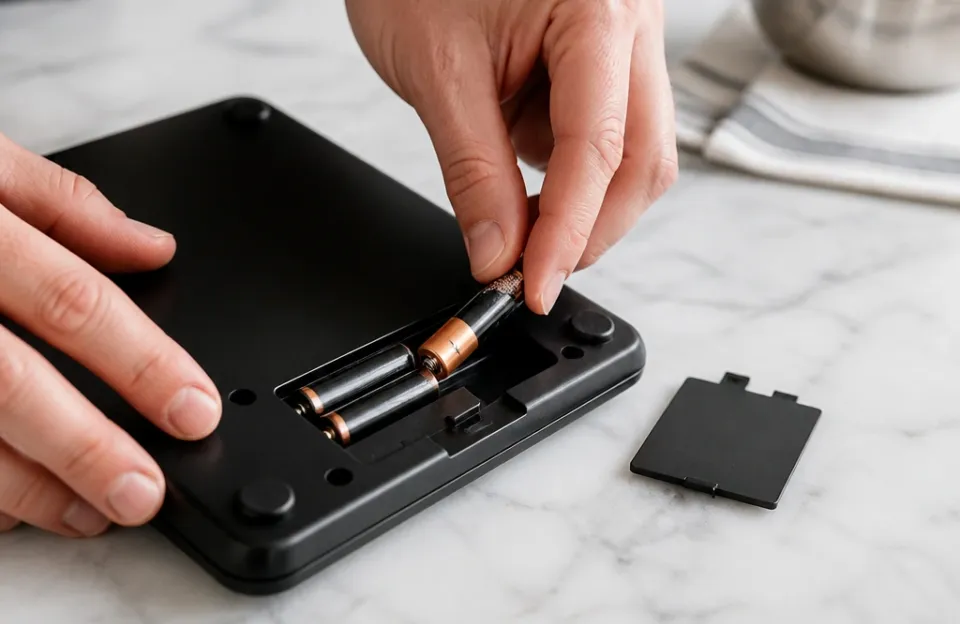
If you won’t use the scale for an extended period, check the manual and remove the batteries. Alkaline cells can leak corrosive electrolyte when they discharge fully or sit unused for a long time, and that residue damages metal contacts and the battery compartment. Treat this as a general risk rather than a guaranteed outcome, and follow the battery maker’s storage guidance.
Remove user-replaceable batteries as the manual directs. Keep stored batteries in packaging or a holder that prevents their terminals touching metal. If you find leakage or corrosion, follow the battery maker’s cleanup instructions rather than treating it as ordinary dust.
Rechargeable scales require different handling, since lithium-ion cells are not interchangeable with alkaline batteries. Check the manufacturer’s manual for storage charge guidance rather than assuming a single percentage works for every pack.
Where to Place the Scale to Protect the Sensors
How you store a food scale determines how long it stays accurate. The load cell is a thin piece of metal engineered to flex slightly under weight, and strain gauges attached to it convert that flex into a digital reading.
Never stack heavy pots, cutting boards or canned goods on top of a stored scale. Both OXO manuals linked above warn against heavy objects during storage because they may affect accuracy. Store it flat on an empty, dry shelf unless its instructions specifically allow another orientation; secure it against falling and keep weight off the platform.
Keep it away from heat sources. Storing a scale directly above the stove or beside a radiator exposes the plastic to thermal expansion cycles and can degrade the adhesive holding the rubber feet.
Without stable feet, the scale wobbles, producing inconsistent readings. A dry pantry shelf or a dedicated kitchen drawer works well as long as the drawer doesn’t slam shut. Keep delicate instruments separated from heavier items like cast iron.
Preventing Calibration Drift During Storage
Calibration drift happens when the scale loses its reference point for zero, and rough handling during storage accelerates the problem. Dropping a scale onto a hard counter can bend the load cell bracket, so handle it carefully.
Pick up a wide scale with two hands. Grabbing a large platform by one corner twists the chassis, and plastic bodies flex when lifted unevenly, transferring torque to the sensor.
Before weighing after long storage, put the scale on a hard, level surface, let it settle at zero, and check it with an appropriate known reference weight. If readings remain wrong after checking the surface, batteries and debris, follow the manual’s troubleshooting or calibration instructions. Some kitchen scales have no user calibration function; do not assume a button combination will recalibrate yours.
Fixing Cloudy Displays and Sticky Keys
First determine whether a mark is on the outside of the display or appears behind it. Clean the exterior using the model’s permitted method. If fogging remains inside, leave the scale off and ask the manufacturer about service; do not pour or work alcohol behind the bezel.
For a sticky key, clean only the outside edge with the permitted cloth or swab. If the key still sticks when dry, stop. Pushing soap, water or solvent underneath it can make the problem worse.
If the empty scale shows erratic numbers, set it on a hard, level surface and check that its feet are stable. Look for debris under a user-removable tray only if the manual permits access there. Lift away loose crumbs with a soft, dry brush without touching the load cell or blowing debris into the housing. Our food scale zeroing guide explains the next checks.
When to Stop and Seek Service
Stop cleaning and contact the manufacturer or replace the scale if the display stays cloudy after drying, a button remains stuck once the keypad is dry, or the scale keeps jumping or drifting after you have removed debris from under the tray. These signs point to failed seals or a damaged load cell rather than surface dirt, and further cleaning or poking at the sensor is more likely to cause harm than help.
Keeping Your Measurements Accurate Long Term
Learning how to clean and store a food scale properly takes less effort than replacing a broken one. Keep liquids away from the seams, never stack heavy items on the platform, check the manual for water-resistance and battery limits, and pull the batteries out before putting the scale away for the season.
A well-maintained scale gives consistent results whether you’re portioning meals or measuring flour for bread. Treat the load cell with respect, wipe up spills immediately, and the device is more likely to last for years.
Frequently Asked Questions
Can I Wash My Food Scale Under Running Water?
No, unless the manufacturer explicitly permits it for your exact model. Running water can enter the seams and damage the circuit board, and even rated models usually do not need full submersion for cleaning.
How Do I Sanitize a Food Scale Without Ruining the Electronics?
Clean first, then use a sanitizer only if both its food-contact label and your scale manufacturer permit it on that part. Follow the required concentration, contact time, rinsing and drying directions without flooding the electronics. Do not assume alcohol, bleach or disinfecting wipes are suitable. If raw meat juices contaminate a part that has no approved sanitizing method, ask the manufacturer before using it for food again.
Should I Leave the Batteries in the Scale When I Put It Away?
Check the manual for your model. Alkaline cells can leak when left unused for long periods, so removing them for extended storage reduces the risk of corrosion damage. Follow the battery maker’s storage guidance for rechargeable packs.
Why Does My Scale Show a Weight When Nothing Is on It?
This can happen when the load cell has been compressed during storage or the scale was bumped. Place it on a flat surface, turn it off and on to let it find zero, and check for crumbs wedged under the platform. If the phantom weight persists, recalibrate or contact the manufacturer.
Is It Safe to Store a Food Scale Standing Vertically?
Only if the manufacturer allows that orientation and the scale can stand securely without loading or damaging its platform. Otherwise store it flat, dry and protected from falls, with nothing heavy on top. Vertical storage is not a calibration method.
Do I Need a Special Cleaner for the Stainless Steel Platform?
Usually a soft cloth and the cleaning method specified in the manual are enough. Hand-wash the platform separately only if the model permits removal and washing. A stainless steel surface is not automatically dishwasher-safe; the OXO 22 lb manual excludes both its removable platform and base from the dishwasher.