Yes. The MeatStick and MeatStick Mini probes are dishwasher safe, sous-vide safe, and deep-fry safe according to the manufacturer’s own order FAQ. That rating covers the probe itself. The same source does not rate the chargers, bases, or hubs for dishwashing, so those parts should stay dry.
Which Parts Can Go in the Dishwasher?
It helps to separate the probe from everything it connects to. The probe is the stainless steel shaft with the ceramic handle that goes into your food. The other pieces are charging and communication hardware.
| Component | Dishwasher Safe? | What to Do |
|---|---|---|
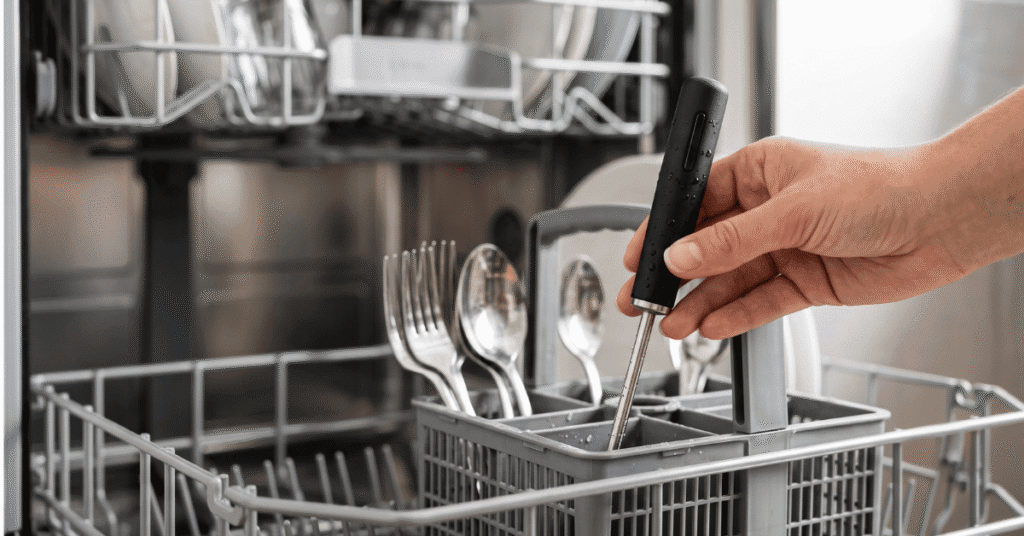
| MeatStick probe | Yes, per the manufacturer | Top rack, secured in a cutlery basket |
| MeatStick Mini probe | Yes, per the manufacturer | Top rack, secured in a cutlery basket |
| Charger | No confirmation of dishwasher safety | Wipe clean with a damp cloth only |
| Bridge / WiFi Link | No confirmation of dishwasher safety | Keep away from water entirely |
| MiniX Charger | No confirmation of dishwasher safety | Wipe clean with a damp cloth only |
When in doubt, treat any part that holds a battery or charging contacts as dry-only.
What the Manufacturer Actually Specifies
The dishwasher claim does not come with a published cycle setting, rack position, or detergent recommendation. Treat those details as general safe practice rather than manufacturer instructions.
What the official FAQ does confirm is directly relevant to cleaning:
- The internal sensors read up to 212°F (100°C), which is the boiling point of water.
- The Dual-Shell ceramic handle is rated to 1200°F (650°C), so it tolerates high heat at the exposed end.
- The Stick should not go in a microwave, because the metal can spark and damage both the Stick and the microwave.
- The Stick should not go in a pressure cooker, because pressure and steam can damage it and a sealed metal pot blocks the Bluetooth signal.
- The Stick turns itself off if it does not detect a cook, meaning the internal temperature stays below 104°F (40°C) for 30 minutes.
None of these statements mention a waterproof or IP rating for the probe. The dishwasher-safe claim stands on the manufacturer’s word, not on a published ingress-protection grade.
How to Clean the MeatStick Probe Safely
Dishwasher use is permitted, but hand washing remains the gentler option for the probe’s finish and charging contacts. These steps reflect general safe practice, not an official cleaning procedure.
- Let the probe cool completely. Do not move a probe from a hot oven or grill directly into cool water. A gradual cooldown avoids unnecessary thermal stress on the ceramic handle.
- Wash with warm, soapy water. Use a soft sponge or dishcloth. Avoid abrasive pads and steel wool on the steel shaft and especially on the charging contacts, since scratching the metal can affect charging performance.
- Clean the sensor transition area. Wipe where the steel shaft meets the ceramic handle so grease and food residue do not build up there.
- Rinse and dry immediately. Pat the probe dry with a soft cloth, paying attention to the charging end.
- Air-dry fully before charging. Give the contacts a few extra minutes to dry completely before the probe goes back on its charger.
If you do use the dishwasher, place the probe in the top rack inside a closed cutlery basket. Secure placement matters more than cycle choice.
Drying and Charging-Contact Care
The charging contacts are the most vulnerable part of the probe during cleaning. Detergent residue or a spotting-agent film left on the metal can interfere with the connection between the probe and its charger.
After any wash, inspect the two metal contact points at the base of the probe. If they look dull or coated, wipe them with a soft cloth dampened with plain water, then dry them thoroughly. Avoid grinding away at the contacts with abrasives.
One compatibility note matters when you test the probe after cleaning: V Series Sticks charge only on V Series bases, not on Classic chargers. If a freshly washed V Series probe will not charge, confirm you are using the matching base before assuming water damage. The MeatStick App supports every MeatStick generation, so you can also check the probe’s status there.
Dishwasher Risks and Placement
The dishwasher-safe rating does not make every part of the appliance safe for the probe. Two risks deserve attention.
The heating element. The exposed heating element at the bottom of many dishwashers, used during heated-dry cycles, reaches temperatures well above what the probe encounters in normal cooking. If the probe falls onto or next to the element, the localized heat can exceed what the probe is designed to handle. A closed cutlery basket on the top rack keeps the probe away from the element and prevents it from falling.
Commercial machines. High-pressure, high-chemical industrial dishwashers are a different environment from a home kitchen appliance. The manufacturer’s claim covers residential dishwashers, so hand washing is the safer choice if you use a commercial machine.
What to Do If the Probe Stops Charging
If the probe fails to charge after washing, work through the simple checks first. Dry the probe completely, clean the charging contacts with a soft damp cloth, and confirm the probe and base belong to the same series. Place the probe on the charger and give it time to register.
If it still will not charge, or if you suspect water has entered the housing, contact The MeatStick support rather than opening the probe or improvising a repair. The official FAQ does not describe a verified remedy for water damage, so manufacturer support is the appropriate next step.
Common Cleaning Mistakes to Avoid
- Charging a wet probe. Moisture on the contacts can prevent charging and, over time, corrode the connection. Dry first, charge second.
- Leaving the probe in the dishwasher overnight. Remove it when the cycle ends, dry it, and return it to its charger.
- Washing the charger or hub. These components have no confirmed dishwasher rating. A damp cloth is enough for the housing.
- Using the microwave or pressure cooker to speed things up. Both are explicitly ruled out by the manufacturer, and the microwave warning involves sparking and damage.
Worth Remembering
The MeatStick probe can go in a residential dishwasher, but that is a convenience, not a requirement. A quick hand wash with warm soapy water, careful attention to the charging contacts, and thorough drying before the probe goes back on its charger will keep it working reliably. Keep the chargers, bases, and hubs dry, and contact support if a probe stops charging after cleaning.